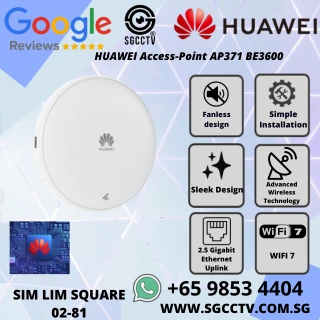
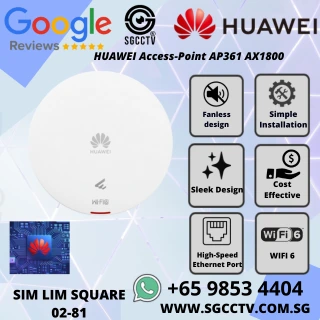

HUAWEI Access Point AP371 BE3600 Wi-Fi 7 dual-band 2.5GE SINGAPORE Access Point Repair & Replace High Speed Router Wireless
$252.00
HUAWEI SINGAPORE PARTNER FULL RANGE
Supply and Maintenance VIGI CCTV IP Cameras, NVR, Turbo HD Cameras, DVR, PTZ Cameras,
WIFI ROUTER ACCESS POINT
Sim Lim Square 02-81 10am-7pm Daily.
Whatsapp Enquiry Project +65 98534404, Technical Support +65 81120788, Site Visit Maintenance +65 81985572.
HUAWEI Access Point AP371 BE3600 Wi-Fi 7 dual-band 2.5GE SINGAPORE Access Point Repair & Replace High Speed Router Wireless
HUAWEI AP371 BE3600 Wi-Fi 7 Access Point Singapore | Dual-Band 2.5GE High-Speed Wireless AP Repair & Replacement | SGCCTV
The HUAWEI eKit AP371 is a new-generation BE3600-class Wi-Fi 7 indoor wireless access point designed for SMEs, offices, retail premises, schools, clinics, warehouses and other commercial environments requiring faster and more reliable wireless connectivity.
With dual-band Wi-Fi 7, up to 3.57Gbps device rate, 2.5GE Ethernet, 2×2 MIMO on both 2.4GHz and 5GHz, built-in smart antennas and PoE support, the AP371 provides a practical upgrade path from ageing Wi-Fi 4, Wi-Fi 5 and Wi-Fi 6 infrastructure. Huawei specifies 150 recommended access users and up to 256 maximum access users under its product specifications. (Ekit)
For businesses experiencing slow Wi-Fi, unstable connections, dead zones, old access points, intermittent wireless service or obsolete routers/APs, SGCCTV can provide wireless troubleshooting, Access Point repair assessment, replacement and network upgrading.
HUAWEI AP371 – BE3600 Wi-Fi 7
The AP371 supports the latest IEEE 802.11be Wi-Fi 7 standard while maintaining compatibility with earlier Wi-Fi generations.
Its wireless radios operate simultaneously across:
2.4GHz — 2×2 MIMO
5GHz — 2×2 MIMO
The combined specified device rate is up to 3.57Gbps, with up to 40MHz channel bandwidth on 2.4GHz and up to 160MHz on 5GHz. (Ekit)
This makes the AP371 suitable for businesses that need high-speed wireless connectivity without moving to a more expensive high-density enterprise AP.
2.5GE High-Speed Network Port
A high-speed Wi-Fi access point should not be unnecessarily restricted by an old 1Gbps wired connection.
The AP371 provides 1 × 100M/1GE/2.5GE auto-sensing RJ45 Ethernet port. (Ekit)
When connected to a compatible 2.5GE PoE switch, the AP can take advantage of a multi-gigabit wired uplink.
This is particularly valuable when upgrading a network for:
Wi-Fi 7 laptops • Smartphones • Cloud applications • NAS • CCTV • Video conferencing • Large file transfers • Business applications
Wi-Fi 7 + 2.5GE = Better Network Infrastructure
Upgrading only the wireless radio while leaving every AP connected through an old network infrastructure can create bottlenecks.
For a more complete upgrade, consider:
Internet Gateway → 2.5GE/10GE Switch → Cat6/Cat6A Cabling → HUAWEI AP371 → Wi-Fi 7 Clients
The actual design depends on Internet bandwidth, switch capability, cable condition and client requirements.
Built-In Smart Antennas
The AP371 incorporates built-in smart antennas rather than relying on visible external antennas.
Huawei specifies an optimal signal distance of approximately 18 metres under its defined conditions. (Ekit)
Actual coverage depends on the installation environment. Concrete walls, metal structures, glass, shelving, neighbouring Wi-Fi networks and RF interference can significantly change practical coverage.
For commercial Wi-Fi, correct AP positioning is generally more important than simply purchasing a router with the highest advertised transmission power.
Up to 150 Recommended Users
Huawei specifies:
Recommended Access Users: 150
Maximum Access Users: 256 (Ekit)
These figures represent device capability rather than a guarantee that 150 users can simultaneously perform bandwidth-intensive applications at maximum speed.
Real-world performance depends on traffic demand, Internet bandwidth, radio conditions, application type and client capability.
For high-density environments, multiple correctly positioned APs are generally preferable to attempting to serve an entire site with one wireless device.
Access Point vs Wireless Router
An Access Point and a Router are not exactly the same device.
A router typically performs functions such as Internet routing, NAT and WAN connectivity.
An access point primarily provides wireless connectivity to an existing network.
The HUAWEI AP371 is a professional wireless Access Point, not simply a consumer home Wi-Fi router.
For commercial installations, a typical architecture is:
Internet → Router/Gateway → PoE Network Switch → AP371 Access Points → Wireless Users
This architecture allows multiple access points to provide coordinated Wi-Fi coverage across larger premises.
Better Than Wi-Fi Repeater for Commercial Networks
A wireless repeater receives an existing Wi-Fi signal and retransmits it.
That can be convenient for small residential applications, but it is not always the preferred architecture for a commercial network.
A professionally installed AP371 can use a wired Ethernet backhaul, allowing traffic to travel directly from the AP into the network.
For offices, shops, warehouses and commercial environments, this can provide a more predictable and scalable network than repeatedly extending an existing wireless signal.
PoE – Power + Network Through One Cable
The HUAWEI AP371 supports IEEE 802.3af/at PoE as well as 12V DC input. Maximum specified power consumption is approximately 13.3W excluding USB. (Ekit)
With a compatible PoE switch:
ONE ETHERNET CABLE = NETWORK DATA + POWER
This provides several installation advantages:
Cleaner Installation – no conventional AC socket required beside the AP.
Flexible Positioning – install the AP where Wi-Fi coverage is required rather than where a power socket happens to be.
Centralised Power – AP power can originate from the network cabinet.
UPS Integration – when the PoE switch and network infrastructure are connected to a correctly sized UPS, AP operation can potentially continue during short mains interruptions.
Ceiling or Wall Installation
The AP371 supports multiple installation methods, including wall and ceiling mounting. (Ekit)
For most commercial environments, correct ceiling positioning can provide better distribution than placing a consumer router inside a cabinet, behind a counter or at one end of the office.
A professional Wi-Fi survey should consider:
Floor Area • Walls • Ceiling Height • User Density • Interference • AP Spacing • Required Speed • Application Type
HUAWEI AP371 for Office Wi-Fi
Modern offices depend heavily on wireless connectivity.
Employees may simultaneously use:
Notebooks • Smartphones • Tablets • Teams/Zoom Meetings • Cloud Software • Email • NAS • Printers • Business Applications
An ageing Wi-Fi router can become a productivity bottleneck.
AP371 provides a modern Wi-Fi 7 + 2.5GE platform suitable for upgrading commercial wireless infrastructure.
HUAWEI AP371 for Retail & Showroom
Retail premises increasingly require connectivity for multiple systems:
Staff Wi-Fi • Mobile Devices • POS • Tablets • Cloud Applications • CCTV Management • Guest Internet
Using professional access points allows the wireless infrastructure to be planned around the physical shop layout rather than relying on one consumer router.
HUAWEI AP371 for Warehouse
Warehouses can be difficult Wi-Fi environments.
Metal shelving, stock, machinery and long aisles can affect RF propagation.
Multiple AP371 access points can be positioned according to actual coverage requirements, with Ethernet/PoE backhaul connecting them to the network.
For warehouse projects, a site assessment is particularly valuable before determining the number of APs.
HUAWEI AP371 for CCTV & Security Networks
Modern security systems increasingly depend on IP networks.
A business may have:
IP CCTV • NVR • Door Access • Video Intercom • Wi-Fi • Mobile Devices • Network Switches • Remote Management
A properly designed network infrastructure can support these systems while using VLANs and other network controls to separate different traffic types where required.
Wireless should generally not replace wired Ethernet for fixed security devices where a reliable wired connection is practical, but it can complement the overall network architecture.
Access Point Repair Singapore
Not every Wi-Fi problem requires immediate replacement.
SGCCTV can first troubleshoot common network and Access Point problems such as:
AP No Power
PoE Failure
AP Offline
Cannot Connect to Wi-Fi
Slow Wireless Speed
Frequent Disconnection
Weak Wi-Fi Coverage
Network Cable Fault
PoE Switch Problem
Configuration Problem
The objective is to identify whether the fault originates from the AP, cabling, PoE switch, router, Internet service or network configuration.
Access Point Replacement Singapore
For older or failed equipment, replacement may be more practical than component-level repair.
This is particularly true when the existing AP is:
Obsolete • Unstable • Low Speed • End-of-Life • Limited to Older Wi-Fi Standards • Expensive to Repair • Unable to Meet Current User Demand
The HUAWEI AP371 can provide a practical replacement platform where the network design and management architecture are compatible.
Existing cabling, switch capability and PoE standards should be checked before replacement.
Upgrade from 1GE to 2.5GE
Businesses upgrading to Wi-Fi 7 should also examine their wired network.
If the existing switches support only 1GbE, the AP may still operate subject to compatibility, but the wired connection can limit the available uplink capacity.
For a higher-performance design:
2.5GE AP + 2.5GE PoE Switch + Suitable Cabling + Multi-Gigabit Gateway
provides a stronger foundation for current and future wireless requirements.
HUAWEI AP371 Key Specifications
- Wi-Fi 7 / IEEE 802.11be
- BE3600 class
- 3.57Gbps maximum device rate
- Dual-band 2.4GHz + 5GHz
- 2×2 MIMO on both radios
- 4 spatial streams total
- Up to 160MHz channel width on 5GHz
- 1 × 2.5GE RJ45
- Built-in Smart Antennas
- 23dBm maximum combined transmit power
- 150 recommended access users
- 256 maximum access users
- 18m specified optimal coverage distance
- 802.3af/at PoE
- 12V DC option
- 13.3W maximum consumption excluding USB
- Wall / Ceiling installation
- 180mm diameter × 35mm depth
- Approximately 0.47kg
- Operating temperature -10°C to +50°C (Ekit)
Why Upgrade to HUAWEI AP371?
Wi-Fi 7 High-Speed Wireless
2.5GE Multi-Gigabit Ethernet
Dual-Band 2.4GHz + 5GHz
Smart Antenna Technology
High Client Capacity
PoE Easy Installation
Commercial-Grade AP Architecture
Centralised Network Deployment
Easy Expansion with Additional APs
Suitable for Repair & Replacement Projects
HUAWEI Wi-Fi 7 Access Point Singapore – SGCCTV
For businesses suffering from slow, unstable or ageing wireless infrastructure, replacing old Wi-Fi equipment with a professionally designed AP network can provide better coverage, capacity and manageability.
HUAWEI AP371 BE3600 Wi-Fi 7
HIGH-SPEED Wi-Fi • 2.5GE • PoE • SMART ANTENNA • COMMERCIAL ACCESS POINT
ACCESS POINT REPAIR • REPLACEMENT • NETWORK UPGRADE • Wi-Fi TROUBLESHOOTING
Suitable for:
OFFICE • RETAIL • SHOWROOM • SCHOOL • CLINIC • WAREHOUSE • COMMERCIAL BUILDING • CCTV NETWORK
10 Frequently Asked Questions
1. Is HUAWEI AP371 a Wi-Fi 7 Access Point?
Yes. AP371 supports IEEE 802.11be Wi-Fi 7 on both its 2.4GHz and 5GHz radios. (Ekit)
2. Is AP371 BE3600?
It provides a specified aggregate device rate of approximately 3.57Gbps, commonly positioned in the BE3600 performance class. (Ekit)
3. Does AP371 support 6GHz Wi-Fi?
No. AP371 is a dual-band 2.4GHz + 5GHz Wi-Fi 7 AP. It should not be advertised as a tri-band 6GHz model. (Ekit)
4. Does HUAWEI AP371 have a 2.5GbE port?
Yes. It provides one RJ45 interface supporting 100Mbps, 1Gbps and 2.5Gbps auto-sensing. (Ekit)
5. Can AP371 be powered by PoE?
Yes. It supports IEEE 802.3af and 802.3at PoE, as well as 12V DC power. (Ekit)
6. How many users can AP371 support?
Huawei specifies 150 recommended access users and a maximum of 256 access users. Actual usable capacity depends on application demand and network conditions. (Ekit)
7. Can AP371 replace my old wireless router?
It can replace an old wireless access point where the network is compatible. Because AP371 is an AP rather than a conventional all-in-one Internet router, a gateway/router and network switch may still be required.
8. Is AP371 suitable for offices and warehouses?
Yes. It is designed for indoor commercial wireless coverage. Warehouses and complex sites should be assessed for RF coverage because walls, metal racks and stock can affect wireless signals.
9. Should I repair or replace an old Access Point?
If the problem is cabling, PoE or configuration, repair may be sufficient. If the AP is obsolete, unreliable or limited by older Wi-Fi technology, replacement may provide better long-term value.
10. Is AP371 faster than a Wi-Fi repeater?
A properly installed AP371 with 2.5GE wired Ethernet backhaul can provide a much stronger commercial network architecture than depending solely on wireless repeating. Actual speed still depends on the client, network, Internet service and RF environment.
15 Facebook Hashtags
#HUAWEI #HuaweiAP371 #AP371 #WiFi7 #BE3600 #HuaweiWiFi7 #AccessPoint #WirelessAccessPoint #2Point5GE #PoEAccessPoint #AccessPointRepair #AccessPointReplacement #WiFiSingapore #SGCCTV #Choicecycle
CHOICECYCLE CCTV provides the best HUAWEI Access Point AP371 BE3600 Wi-Fi 7 dual-band 2.5GE
🚀 HUAWEI Access Point AP371 BE3600 Wi-Fi 7 – Dual-Band 2.5GE High-Speed Wireless for Next-Gen Networks
Step into the next generation of wireless networking with the Huawei AP371 BE3600, powered by Wi-Fi 7 (802.11be). Engineered for ultra-high-speed, low-latency connectivity, this dual-band access point is the perfect solution for offices, smart classrooms, retail spaces, and modern enterprise networks that demand cutting-edge wireless performance.
🌐 Key Features of Huawei AP371 BE3600 Wi-Fi 7 Access Point
⚡ Next-Gen Wi-Fi 7 Performance (802.11be)
Dual-band concurrent operation (2.4 GHz and 5 GHz)
Delivers up to 3600 Mbps total wireless throughput
Enhanced multi-user performance using Multi-Link Operation (MLO) and 4K QAM
🔗 2.5 Gigabit Ethernet Uplink
Equipped with 1 × 2.5GE Ethernet port
Supports PoE+ for simplified deployment without the need for separate power lines
Eliminates uplink bottlenecks for faster wired backhaul
📡 Smart RF Optimization
OFDMA + MU-MIMO for seamless multi-user connections
Beamforming technology ensures strong, stable signals in every direction
Intelligent interference mitigation and signal adjustment in real time
🛡️ Enterprise-Grade Security
Supports WPA3 encryption, secure authentication, and SSID isolation
Integrated firewall and rogue AP detection
Built-in protection against network attacks and unauthorized access
⚙️ Centralized Cloud Management
Compatible with Huawei CloudCampus and Agile Controller platforms
Enables remote monitoring, configuration, firmware updates, and traffic analytics
Scalable for distributed environments with multiple access points
🧱 Modern, Versatile Design
Compact, sleek housing with ceiling or wall-mount options
Fanless for silent operation – perfect for offices, schools, and hospitals
Designed for aesthetic integration with modern interiors
📍 Ideal for:
Smart offices, co-working spaces & high-speed enterprise networks
Modern classrooms, educational institutions & hybrid learning spaces
Retail outlets, healthcare centers, and IoT-powered environments
✅ Why Choose the Huawei AP371 BE3600?
Wi-Fi 7 Ready – future-proof your network with the latest wireless standard
2.5GE performance – break free from gigabit limits
Cloud-managed, secure & reliable – built for professional use
Backed by Huawei’s trusted enterprise-grade hardware
📞 Get the Huawei AP371 BE3600 Today – Fast Wireless, Future Ready
📧 Email: enquiry@choicecycle.com.sg
📱 WhatsApp: +65 9853 4404
🌐 Website: https://choicecycle.com.sg
🏬 Visit Us: SGCCTV Choicecycle, Sim Lim Square #02-81, Singapore
🕚 Open Daily: 11 AM – 8 PM
Huawei AP371 BE3600 – Unlock Wi-Fi 7 Speed, Security & Scalability for Your Business.
Available now at Singapore’s trusted networking provider – SGCCTV Choicecycle.
HUAWEI Access Point AP371 BE3600 Wi-Fi 7 dual-band 2.5GE SINGAPORE Access Point Repair & Replace High Speed Router Wireless


Nunc lacus elit, faucibus ac laoreet sed, dapibus ac mi. Maecenas eu ante a elit tempus fermentum. Aliquam commodo tincidunt semper. Phasellus accumsan, justo ac mollis pharetra, ex dui pharetra nisl, a scelerisque ipsum nulla ac sem. Cras eu risus urna. Duis lorem sapien, congue eget nisl sit amet, rutrum faucibus elit.
Donec accumsan auctor iaculis. Sed suscipit arcu ligula, at egestas magna molestie a. Proin ac ex maximus, ultrices justo eget, sodales orci. Aliquam egestas libero ac turpis pharetra, in vehicula lacus scelerisque. Vestibulum ut sem laoreet, feugiat tellus at, hendrerit arcu.
Nunc lacus elit, faucibus ac laoreet sed, dapibus ac mi. Maecenas eu ante a elit tempus fermentum. Aliquam commodo tincidunt semper. Phasellus accumsan, justo ac mollis pharetra, ex dui pharetra nisl, a scelerisque ipsum nulla ac sem. Cras eu risus urna. Duis lorem sapien, congue eget nisl sit amet, rutrum faucibus elit.