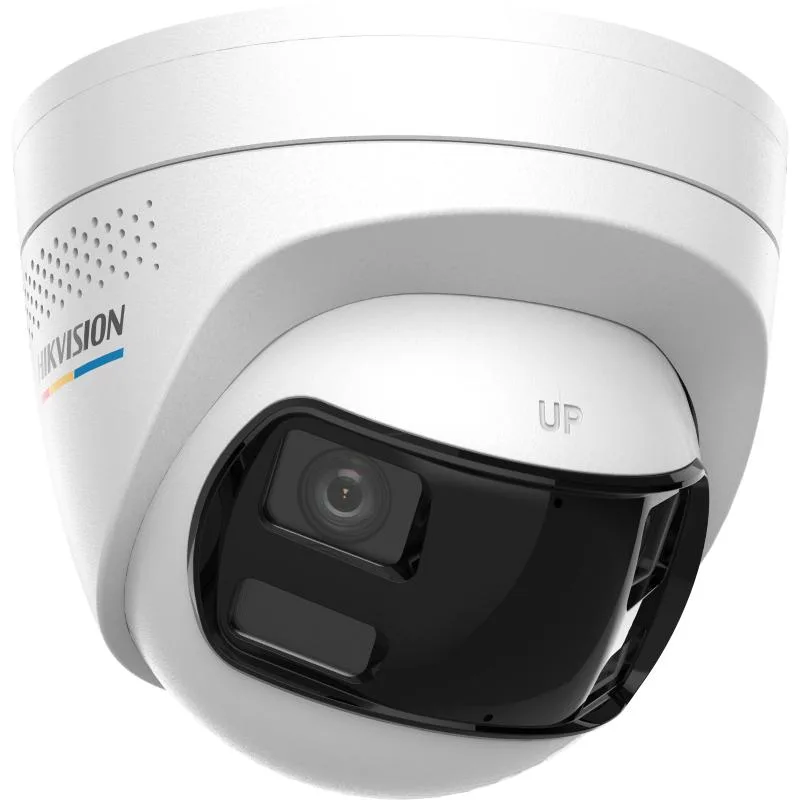
Hikvision DS-2CD1367G2HP-LIUF-S-L–RB- Dome Singapore

Hikvision DS-2CD1367G2HP-LIUF-S-L–RB- Dome Singapore

$228.00

Hikvision DS-2CD1367G2HP-LIUF-S-L–RB- — available from SGD $228.00 at SGCCTV, authorised dealer at Sim Lim Square #02-81, Singapore. WhatsApp +65 98534404 for pricing.

  • Network Products
  • Turbo HD Products
  • Speed Gates and Turnstiles
- +

Hikvision DS-2CD1367G2HP-LIUF-S-L–RB- Dome Singapore | 6MP Dual Lens ColorVu Camera

Welcome to the official product page for the Hikvision DS-2CD1367G2HP-LIUF-S-L–RB-, a cutting-edge surveillance solution tailored for the demanding security needs of the Singapore market. This high-performance dome camera represents the pinnacle of modern visual monitoring technology, combining two distinct optical lenses into a single, seamless 6-megapixel view. In an era where security is paramount, this device offers a unique advantage by allowing business owners and homeowners to stitch together two sub-streams into one wide-angle image without the need for manual panning or switching. Why does this matter for buyers in Singapore? The compact, sleek dome design is unobtrusive, making it perfect for the high-density urban environments found in Singapore. Whether you are securing a residential estate in the West or a commercial hub in the CBD, this device ensures you never miss a frame, day or night, providing peace of mind to every Singaporean business owner.

Key Features of the DS-2CD1367G2HP-LIUF-S-L–RB-

  • Dual-Lens Stitching: This device utilizes a unique dual-lens design that stitches two 4MP sub-streams together to create a seamless 6MP full image, providing an incredibly wide field of view in a compact form factor.

  • ColorVu Technology: Featuring Hikvision’s ColorVu technology, the camera captures high-quality, true-color images even in low-light conditions, eliminating the need for bulky IR illuminators and reducing heat generation.

  • Smart Hybrid Light: The built-in hybrid light system ensures that faces and license plates remain visible and clear in both day and night scenarios, significantly enhancing forensic capabilities.

  • 6MP Ultra HD Resolution: With a resolution of up to 6 Megapixels, this camera captures every detail with crystal clarity, allowing for high-quality zooming and cropping without losing image quality.

  • Wide Dynamic Range (WDR): The camera features advanced WDR technology to handle high-contrast lighting environments, ensuring clear images are maintained even when facing bright sunlight or strong artificial lights.

  • IP67 Weatherproof Rating: Designed to withstand the harsh tropical climate of Singapore, this unit is fully waterproof and dustproof, ensuring reliable operation in rain, humidity, and extreme heat.

  • PoE Power Delivery: Power over Ethernet (PoE) allows for a single cable to transmit both data and power, simplifying installation and reducing the clutter of separate power adapters.

  • Advanced Analytics: The camera supports intelligent video analytics such as intrusion detection, line crossing, and loitering detection, which are integrated directly into the firmware for smarter security.

  • Dome Aesthetic: The sleek, rounded dome housing not only protects the internal components from dust and debris but also blends seamlessly into ceilings, providing a professional look in office environments.

Technical Specifications

SpecificationDetail
Model NumberDS-2CD1367G2HP-LIUF-S-L–RB-
Effective Resolution6MP (2688 x 1520)
Frame Rate25fps @ 6MP; 25fps @ 4MP (sub-stream)
Minimum Illumination0.001 Lux @ F1.2 (ColorVu); 0 Lux (ColorVu)
Field of ViewWide Angle (Stitched)
CompressionH.265 / H.264+
Interface1 x 10/100M PoE+
Power SupplyDC 12V or PoE (Power over Ethernet)
DimensionsApprox. 142mm (D) x 124mm (H) x 100mm (W)
WeightApprox. 450g
IP RatingIP67
Operating Temperature-30°C to +60°C

Applications & Use Cases

Warehouse: In a large warehouse facility, the wide-angle stitching capability allows for comprehensive coverage of the entire warehouse floor, reducing the number of cameras needed while maintaining high-definition detail on pallets and personnel.

Factory: For factory floors where lighting can be inconsistent, the ColorVu feature ensures that machinery and safety zones are clearly visible without relying solely on infrared light, which might wash out details.

Retail: Retail stores benefit from the high zoom capability, allowing staff to monitor aisles effectively and track customer behavior or detect shoplifting incidents in real-time.

HDB/Condo: In Singapore’s high-rise HDB and condominium estates, this camera is ideal for lobby monitoring, ensuring that visitors and residents are identified clearly via the high-resolution sensors.

Office: Office environments utilize the sleek dome design to maintain a professional aesthetic while securing sensitive areas like server rooms or reception desks against unauthorized entry.

Car Park: The IP67 rating makes this unit perfect for outdoor car parks where it must withstand the heavy monsoon rains typical of Singapore, ensuring license plate recognition remains accurate 24/7.

Why Choose the DS-2CD1367G2HP-LIUF-S-L–RB- in Singapore?

Buying security equipment in Singapore is a critical decision, and this camera stands out for its tropical resilience. Singapore is known for its humidity, and this device is engineered to withstand the wet and dry seasons seamlessly. The power supply here is 230V, and this camera supports both PoE and 12V DC, offering flexibility for Singapore’s diverse electrical infrastructure. Furthermore, the strict PDPA regulations in Singapore require high-quality evidence capture, which this 6MP camera delivers effortlessly. Whether you are deploying this across the CBD, the residential estates in the north, or industrial zones in Singapore, you can trust its reliability. Ultimately, choosing this camera ensures that your security infrastructure in Singapore is always active, compliant, and ready for any eventuality.

Installation Guide

Power and Cable: The installation begins with running a Cat5e or Cat6 Ethernet cable. For PoE, you can power the unit directly from a PoE switch or injector, simplifying the cabling significantly in new builds in Singapore. Ensure the cable is rated for the length required, especially for large estates.

Network Setup: Connect the camera to your NVR or PoE switch. The camera will automatically configure its IP address via DHCP. If your network is static, use the Hikvision SADP Tool to locate and configure the device manually. Ensure your network is segregated for security, a best practice widely adopted in Singapore enterprises.

App Configuration: Download the Hik-Connect App on your iOS or Android device. Scan the QR code on the camera or enter the device code to add it to the app. The app allows you to view live feeds, adjust settings remotely, and receive motion alerts directly to your phone, which is essential for Singapore expats living overseas.

Maintenance Tips

Regular maintenance is crucial for the longevity of this camera. The dome cover should be cleaned gently with a microfiber cloth to remove dust and dirt, ensuring the lens remains clear. In Singapore’s humid weather, do the cleaning weekly to prevent buildup. Check the cable connections every six months to ensure they are tight and free from corrosion, which can happen due to the tropical humidity. If the camera is used outdoors, inspect the mounting bracket for rust or water ingress. By following these simple checks, you ensure the device continues to provide reliable surveillance for years.

Where to Buy

SGCCTV — Authorised Hikvision & Dahua Dealer Singapore

Address: 1 Rochor Canal Road, Sim Lim Square #02-81, Singapore

Email: enquiry@choicecycle.com.sg

WhatsApp: +65 98534404 (24 hours)

Operating Hours: 10:00 AM – 5:00 PM

Website: https://sgcctv.com.sg

You can purchase the Hikvision DS-2CD1367G2HP-LIUF-S-L–RB- directly from SGCCTV, a trusted specialist in the region. Visit our physical store in Sim Lim Square to see the unit in person. We also offer direct sales via WhatsApp and Email, making it easy to order regardless of your location in Singapore. SGCCTV is committed to providing genuine Hikvision products with full warranty support.

FAQs

Q1: How difficult is the setup for this Hikvision device?
Setting up the Hikvision DS-2CD1367G2HP-LIUF-S-L–RB- is generally straightforward for users with basic networking knowledge. The device supports Plug & Play via PoE, meaning you simply connect the cable, and the device powers on. If using a PoE switch, the camera configures automatically. However, for advanced users in Singapore, the Hik-Connect app simplifies remote setup even further. You can download the app, scan the QR code, and configure the device without needing to open the NVR’s PC software immediately. While it is easy for beginners, the full configuration of analytics features may require a deeper understanding of security protocols, but the default settings are optimized for immediate use.

Q2: What is the night vision range for this camera?
The night vision range is exceptional due to the ColorVu technology embedded within this model. Unlike older cameras that rely on infrared light (which produces a green/black image), this camera uses ambient light to produce full-color images even in very low-light scenarios. In total darkness, the unit switches to black and white, utilizing the sensor’s high sensitivity to capture visible light. The effective range is typically up to 30-40 meters in dark conditions, depending on the installation height and lighting. This is a massive advantage for Singaporean homes where ambient street lighting is often minimal in backyards. The hybrid light feature ensures faces are never dark, providing clear forensic details even at night.

Q3: Can I use this camera with a dual lens setup?
Yes, the Hikvision DS-2CD1367G2HP-LIUF-S-L–RB- is specifically designed with a dual-lens architecture internally, though it presents a single stitched image. This means it is not a PTZ camera that moves; instead, it “stitches” two separate 4MP sub-streams together into one wide-angle 6MP view. This design is unique and powerful because it allows you to cover a massive area without the need for multiple cameras. The stitching happens in real-time, providing a seamless panoramic view. This is perfect for wide corridors or large rooms where a single PTZ might be too slow or too narrow. The dual-lens usage is a hardware feature, so there is no need for external software stitching, making it a cost-effective solution for large spaces.

Q4: How weather-resistant is this dome unit?
This unit is rated IP67, which is the highest standard for weatherproofing for a dome camera. This rating means it is completely dust-tight and can withstand temporary immersion in water, making it ideal for Singapore’s heavy monsoon rains. The dome is sealed to prevent water ingress, protecting the internal electronics from corrosion. However, for outdoor installation, ensure the mounting bracket is also weather-resistant. While the camera itself is durable, prolonged submersion is not recommended. In Singapore’s tropical environment, where rain is frequent, this rating ensures the camera will continue to operate without failure. Regular cleaning to remove grime is important to maintain the seal’s integrity.

Q5: What power supply does this camera require?
The camera supports two primary power supply methods: Power over Ethernet (PoE) and DC 12V. PoE is highly recommended for new installations because it simplifies cabling, requiring only one cable for both power and data. You can use a standard PoE switch or a PoE injector. If you prefer DC power, use a 12V DC adapter, ensuring the polarity matches the camera’s requirements. In Singapore, most power supplies are 230V AC, so you will need a PoE switch or a PoE injector connected to a 230V power outlet. This flexibility allows you to install the camera in various locations, from office ceilings to outdoor lamp posts, without worrying about running separate power lines. Ensure the PoE switch supports 802.3at (PoE+) for best performance.

Q6: How does this camera integrate with storage (NVR)?
This camera integrates seamlessly with Hikvision NVRs that support H.265 compression. When connected to an NVR, the camera’s firmware will automatically register, and you can configure recording schedules via the NVR’s web interface or software. The camera supports both main and sub-streams, allowing you to record high-quality 6MP video and a lower-resolution preview stream simultaneously to save storage space. If you do not own an NVR, you can use third-party NVRs, as the camera supports ONVIF standards. However, for advanced analytics like human detection, an Hikvision NVR is recommended. Storage capacity depends on your footage retention needs; for example, 6MP footage at 25fps requires significant space. Ensure you calculate your storage needs based on your desired retention period, as 30 days of 6MP footage requires a robust hard drive array.

Q7: What warranty does Hikvision offer?
Hikvision typically offers a 1 to 3-year warranty on their commercial and industrial cameras, depending

Reviews

There are no reviews yet.

Be the first to review “Hikvision DS-2CD1367G2HP-LIUF-S-L–RB- Dome Singapore”

Your email address will not be published. Required fields are marked *

Donec accumsan auctor iaculis. Sed suscipit arcu ligula, at egestas magna molestie a. Proin ac ex maximus, ultrices justo eget, sodales orci. Aliquam egestas libero ac turpis pharetra, in vehicula lacus scelerisque. Vestibulum ut sem laoreet, feugiat tellus at, hendrerit arcu..

Nunc lacus elit, faucibus ac laoreet sed, dapibus ac mi. Maecenas eu ante a elit tempus fermentum. Aliquam commodo tincidunt semper. Phasellus accumsan, justo ac mollis pharetra, ex dui pharetra nisl, a scelerisque ipsum nulla ac sem. Cras eu risus urna. Duis lorem sapien, congue eget nisl sit amet, rutrum faucibus elit.

Donec accumsan auctor iaculis. Sed suscipit arcu ligula, at egestas magna molestie a. Proin ac ex maximus, ultrices justo eget, sodales orci. Aliquam egestas libero ac turpis pharetra, in vehicula lacus scelerisque. Vestibulum ut sem laoreet, feugiat tellus at, hendrerit arcu.

Nunc lacus elit, faucibus ac laoreet sed, dapibus ac mi. Maecenas eu ante a elit tempus fermentum. Aliquam commodo tincidunt semper. Phasellus accumsan, justo ac mollis pharetra, ex dui pharetra nisl, a scelerisque ipsum nulla ac sem. Cras eu risus urna. Duis lorem sapien, congue eget nisl sit amet, rutrum faucibus elit.

Start typing and press Enter to search

Shopping Cart

No products in the basket.