




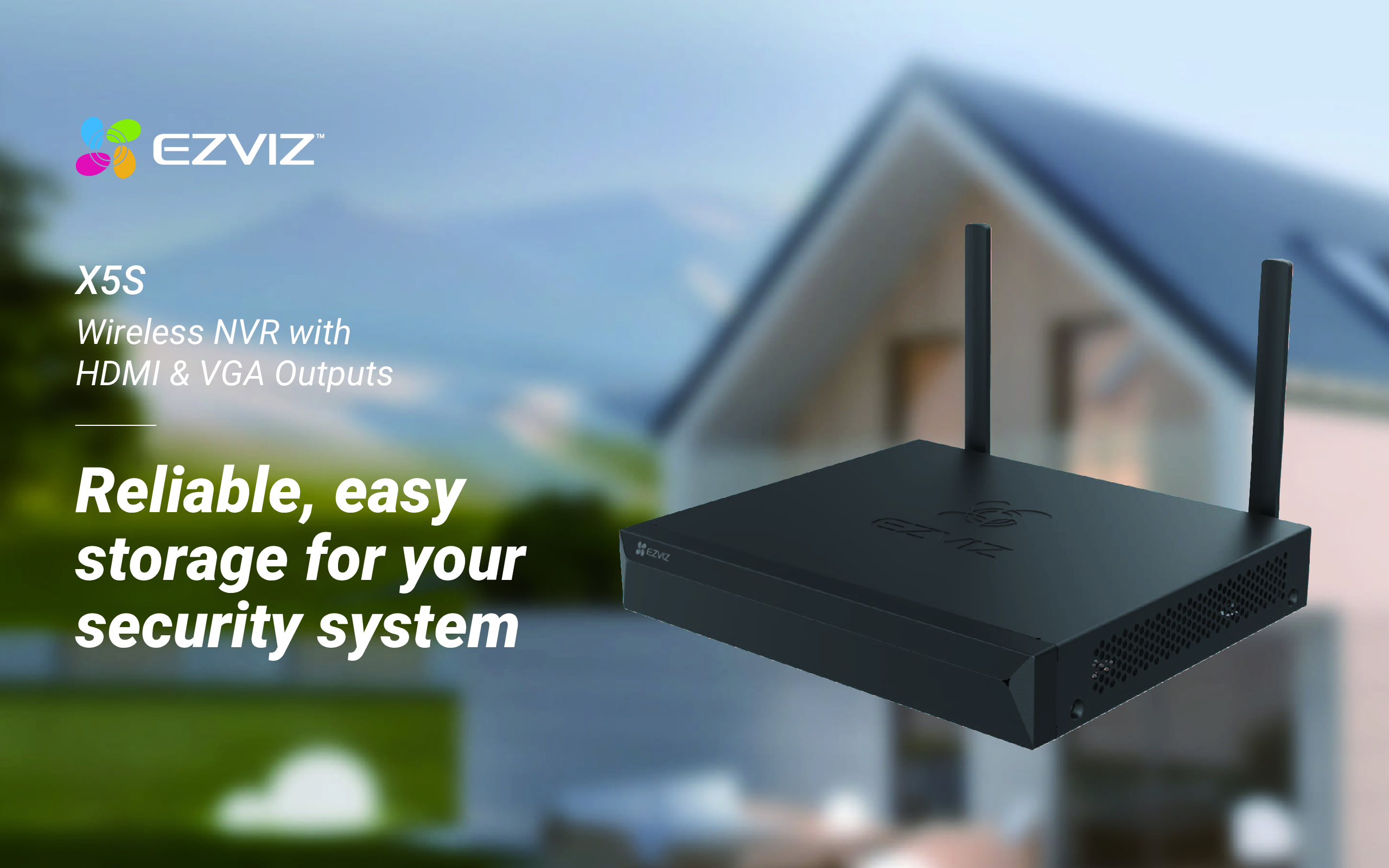
EZVIZ X5S WIRELESS NETWORK VIDEO RECORDER WIFI NVR WIFI Password ezviz_SBOSHL WIFI IP Cameras Singapore
$398.00
EZVIZ SINGAPORE OFFICIAL PARTNER – Full Range
Supply and Maintenance Ezviz CCTV IP Cameras, NVR, Turbo HD TVI Cameras, DVR, PTZ Cameras,
Access Control System, Video Intercom.
Sim Lim Square 02-81 10am-7pm Daily.
Whatsapp Enquiry Project +65 98534404, Technical Support +65 81120788, Site Visit Maintenance +65 81985572.
EZVIZ X5S WIRELESS NETWORK VIDEO RECORDER WIFI NVR WIFI Password ezviz_SBOSHL WIFI IP Cameras Singapore
EZVIZ X5S Wireless Network Video Recorder | WiFi NVR | X5S-4W / X5S-8W | WiFi Password ezviz_SBOSHL | WiFi IP Cameras Singapore
The EZVIZ X5S Wireless Network Video Recorder is a compact WiFi NVR designed for homes, retail shops, offices and small commercial CCTV installations that require centralised recording of EZVIZ wireless IP cameras.
The X5S wireless family is available mainly as the X5S-4W and X5S-8W, supporting up to 4 or 8 compatible WiFi cameras respectively. It combines local HDD recording, H.265 compression, HDMI/VGA monitor output, EZVIZ App remote viewing and a built-in 2.4GHz wireless network for compatible cameras. (EZVIZ)
EZVIZ X5S Key Specifications
| Feature | X5S-4W | X5S-8W |
|---|---|---|
| Wireless Camera Channels | 4 | 8 |
| Compatible Cameras | EZVIZ / compatible ONVIF | EZVIZ / compatible ONVIF |
| WiFi Frequency | 2.4GHz | 2.4GHz |
| WiFi Antennas | 2 | 2 |
| Maximum Rated Wireless Range | Up to 100m* | Up to 100m* |
| Ethernet | 1 × 10/100Mbps | 1 × 10/100Mbps |
| Required Access Bandwidth | 50Mbps | 100Mbps |
| Video Compression | H.265 / H.264 | H.265 / H.264 |
| HDMI Output | Up to 2560 × 1440 | Up to 2560 × 1440 |
| VGA Output | Up to 1920 × 1080 | Up to 1920 × 1080 |
| Local Storage | Internal HDD | Internal HDD |
| Mobile Management | EZVIZ App | EZVIZ App |
*Wireless range is highly dependent on walls, interference, camera position and the surrounding RF environment. (EZVIZ)
Wireless NVR for EZVIZ WiFi Cameras
The X5S-4W and X5S-8W can create a direct wireless connection with compatible cameras.
A typical installation is:
EZVIZ WiFi CAMERA
↓
2.4GHz WiFi
↓
EZVIZ X5S NVR
↓
HARD DISK RECORDING
↓
HDMI MONITOR
and, when connected to the Internet:
X5S NVR
↓
ROUTER / INTERNET
↓
EZVIZ MOBILE APP
This makes the X5S useful where installing CAT6 from every camera back to the recorder is difficult.
X5S-4W vs X5S-8W
The main difference is the number of cameras.
X5S-4W
Supports up to:
4 WiFi Cameras
This is suitable for a small shop, office, home or other compact CCTV installation.
X5S-8W
Supports up to:
8 WiFi Cameras
This is better suited to installations requiring additional coverage.
EZVIZ’s support documentation also indicates that the 4W and 8W models can link compatible cameras directly to the NVR’s wireless network or link cameras located on the same router/LAN. (EZVIZ)
WiFi Password: ezviz_SBOSHL
When troubleshooting an existing EZVIZ X5S installation, technicians may encounter a wireless network name similar to:
ezviz_SBOSHL
This is an example of the NVR’s EZVIZ wireless network identifier. The characters after ezviz_ can differ from one recorder to another.
It is important not to assume that:
ezviz_SBOSHL is the WiFi password.
It may be the SSID / wireless network name, not the password.
For example:
SSID: ezviz_SBOSHL
and:
Password: device-specific credential
are two separate items.
The actual credentials depend on the X5S configuration and device.
EZVIZ X5S Password Types
One of the most confusing parts of troubleshooting an X5S is that several different credentials may exist.
| Credential | Purpose |
|---|---|
| NVR Login/Admin Password | Login to X5S locally |
| Device Verification Code | Device verification / recovery |
| Camera Verification Code | Camera-specific verification |
| Encryption Password | Used when accessing encrypted video |
| EZVIZ Account Password | Login to the EZVIZ mobile account |
| NVR WiFi Credential | Camera-to-NVR wireless connection |
These should not automatically be treated as the same password.
Forgot EZVIZ X5S Admin Password?
EZVIZ provides a recovery procedure for the X5S.
One supported method is to reset the NVR, after which the password defaults to the original device verification code printed on the NVR label.
EZVIZ also documents this local procedure:
1. Go to the NVR login window
2. Double right-click at the lower-left corner
3. Select OK when “Restore Default Password” appears
4. The password returns to the device verification code
The verification code is the six uppercase letters printed on the white NVR sticker. (Ezviz)
For example:
Verification Code: ABCDEF
This is only an example. Always use the verification code printed on the actual recorder.
How to Add X5S to EZVIZ App
First make sure the NVR is online.
Then:
Open EZVIZ App
↓
Press + Add Device
↓
Scan QR Code on X5S
↓
Follow Setup Wizard
↓
X5S ADDED TO EZVIZ ACCOUNT
If the app asks for a password during the adding process, EZVIZ states that the required credential can be the verification code printed on the white sticker on the NVR box. (EZVIZ)
How to Add a WiFi Camera to X5S
For the X5S-4W and X5S-8W:
Step 1 — Power On Camera
Switch on the EZVIZ camera.
Step 2 — Put Camera into WiFi Configuration Mode
For compatible EZVIZ cameras, resetting the camera can put it into configuration mode.
Step 3 — Open X5S Camera Management
On the monitor:
Right Click
→ Menu
→ Camera Management
→ Search
Step 4 — Find Camera
Allow the X5S to search for compatible cameras.
Step 5 — Add Camera
Select:
ADD
The camera can then link to the X5S wireless network. (EZVIZ)
Camera Can Work Without Internet
An important advantage of the X5S architecture is that compatible WiFi cameras can connect directly to the recorder.
Therefore:
CAMERA → X5S → LOCAL MONITOR
can continue functioning locally even without Internet access, provided the cameras and NVR have already been correctly configured.
Internet access is primarily required for services such as remote mobile access.
This means:
No Internet ≠ No Local CCTV Recording
A correctly configured local surveillance network can continue recording to the NVR HDD.
H.265 Video Compression
The X5S supports:
H.265
H.264
EZVIZ states that its H.265 implementation can reduce storage and bandwidth requirements substantially compared with H.264 under its test conditions. (EZVIZ)
This is particularly useful for WiFi CCTV because efficient compression reduces both:
Wireless Network Traffic
and
Hard Disk Storage Consumption
HDD Local Recording
The X5S is designed for:
LOCAL HARD DISK RECORDING
This provides a major advantage over camera-only systems relying exclusively on individual microSD cards.
A central NVR provides:
Central Recording
Multi-Camera Playback
Local Monitor
Central Storage
Search & Review
Remote Viewing
The HDD is model/configuration dependent and may need to be purchased separately. (EZVIZ)
HDMI & VGA Monitor Output
The X5S provides both:
HDMI
and:
VGA
video output.
Published specifications for the X5S-4W/8W family list HDMI output up to 2560 × 1440 at 30Hz and VGA up to 1920 × 1080 at 60Hz. (EZVIZ)
This allows the NVR to be connected directly to:
CCTV Monitor
Computer Monitor
Television
Security Counter Display
A USB mouse can then be used for local operation.
WiFi CCTV Has Limitations
Wireless CCTV can be convenient, but it should not be treated as equivalent to a properly installed wired network under every condition.
WiFi performance can be affected by:
Concrete Walls
Metal Structures
Long Distance
Neighbouring WiFi Networks
2.4GHz Interference
Microwave Equipment
Wireless Routers
Camera Placement
Building Layout
EZVIZ itself warns that physical obstacles, interference and excessive camera-to-NVR distance can reduce wireless performance. (EZVIZ)
For critical commercial surveillance, wired CAT6/PoE remains preferable where practical.
X5S WiFi Camera Keeps Disconnecting?
If an EZVIZ camera repeatedly goes offline, check:
1. Camera Power
2. Camera-to-NVR Distance
3. Walls between NVR and Camera
4. WiFi Interference
5. Camera Configuration Mode
6. NVR Wireless Connection
7. Camera Password / Verification Code
8. NVR Firmware
9. Camera Firmware
10. Network Router
EZVIZ specifically recommends bringing the camera close to the NVR with minimal barriers when troubleshooting camera-linking problems. (EZVIZ)
WiFi Signal Test
A useful diagnostic test is:
Move the camera temporarily next to the X5S.
If:
Camera close to X5S → Stable
but:
Camera at installation location → Offline
the likely problem is the wireless path rather than the NVR.
Investigate:
Distance
Walls
Metal
RF Interference
Camera Position
before replacing the camera.
X5S Camera Offline After Reset
If a camera has been reset, it may no longer retain the previous wireless configuration.
Put the camera back into configuration mode and then use:
X5S
→ Menu
→ Camera Management
→ Search
→ Add
to reconnect it.
X5S NVR Password vs Camera Password
The X5S NVR and individual cameras can use different credentials.
For example:
X5S Admin Password: Password A
Camera Verification Code: Password B
EZVIZ Account Password: Password C
If the wrong credential is entered, the system may display authentication or encryption errors even though the camera itself is operating normally.
Identify which password the system is requesting before resetting equipment.
EZVIZ Encryption Password
When viewing a camera, EZVIZ states that the requested encryption password can depend on how the camera was originally configured.
For cameras added directly through the NVR, it may use the login password created for the NVR during setup.
For cameras configured through the EZVIZ App, it may use the verification code printed on the individual camera’s label. (Ezviz)
This distinction is important when troubleshooting an existing system.
Typical EZVIZ X5S Applications
The X5S can be suitable for:
Home CCTV
Small Office
Retail Shop
Temporary CCTV
Small Warehouse
Reception Area
Small Commercial Premises
WiFi Security Cameras
Existing EZVIZ Camera Systems
For larger or mission-critical installations, consider a wired PoE architecture.
WiFi NVR vs PoE NVR
| Feature | X5S WiFi NVR | PoE NVR |
|---|---|---|
| Camera Connection | Wireless | CAT6 |
| Installation | Easier in some locations | Requires cabling |
| Interference | Possible | Very Low |
| Physical Obstacles | Can Affect Signal | Minimal Effect |
| Reliability | Environment Dependent | Generally Higher |
| Central Recording | Yes | Yes |
| Remote Viewing | Yes | Yes |
| Best Application | Small / difficult cabling | Professional CCTV |
For security-critical sites, wired CAT6 remains the preferred design where installation is feasible.
SGCCTV EZVIZ CCTV Singapore
SGCCTV – Choicecycle CCTV Pte Ltd provides support for:
EZVIZ X5S Wireless NVR
EZVIZ WiFi Cameras
WiFi NVR Troubleshooting
EZVIZ Camera Offline
EZVIZ Password Reset
EZVIZ Verification Code
EZVIZ App Configuration
WiFi Camera Reconnection
NVR HDD Replacement
CCTV Network Troubleshooting
WiFi CCTV Upgrade
PoE CCTV Upgrade
Website: choicecycle.com.sg
Email: enquiry@choicecycle.com.sg
WhatsApp: +65 9853 4404
10 Frequently Asked Questions
1. What is the EZVIZ X5S?
The X5S is a Network Video Recorder designed to centrally record and manage compatible EZVIZ/IP cameras. The X5S-4W and X5S-8W are wireless versions supporting 4 and 8 cameras respectively.
2. Does the X5S create its own WiFi network?
The X5S-4W and X5S-8W can connect compatible cameras directly through the NVR’s 2.4GHz wireless network.
3. Is ezviz_SBOSHL the WiFi password?
Not necessarily. A name such as ezviz_SBOSHL can be the wireless SSID. Do not assume the SSID itself is the password.
4. What is the default X5S password after password restoration?
EZVIZ states that the password returns to the six-capital-letter verification code printed on the white NVR label when using its supported restore-default-password procedure. (Ezviz)
5. How many cameras can the X5S support?
The X5S-4W supports up to four compatible WiFi cameras, while the X5S-8W supports up to eight. (EZVIZ)
6. Does the X5S support H.265?
Yes. The X5S supports H.265 and H.264 video compression.
7. Can X5S record without Internet?
Local recording can continue without Internet when the cameras are directly linked and the local system is correctly configured. Internet is needed for cloud-connected features such as remote access.
8. Can I connect the X5S directly to a monitor?
Yes. The wireless X5S models provide HDMI and VGA outputs.
9. Why does my EZVIZ WiFi camera keep going offline?
Common causes include weak WiFi signal, excessive distance, walls, interference, power problems or configuration issues.
10. Can SGCCTV troubleshoot an existing EZVIZ X5S system?
Yes. Troubleshooting can cover the NVR, WiFi connection, cameras, passwords, verification codes, HDD, router, EZVIZ App and network configuration.
SEO Keywords
EZVIZ X5S Singapore, EZVIZ X5S WiFi NVR, Wireless Network Video Recorder Singapore, EZVIZ X5S-4W, EZVIZ X5S-8W, ezviz_SBOSHL, EZVIZ WiFi Password, EZVIZ NVR Password Reset, EZVIZ Verification Code, EZVIZ WiFi Camera Singapore, Wireless CCTV Singapore, EZVIZ Camera Offline, EZVIZ NVR Repair, EZVIZ App Setup, WiFi CCTV Camera Singapore, SGCCTV, Choicecycle CCTV
Facebook Hashtags
#EZVIZ #EZVIZX5S #WirelessNVR #WiFiNVR #WiFiCamera #WirelessCCTV #EZVIZCamera #NVR #CCTVSingapore #WiFiCCTV #CCTVRepair #SecurityCamera #SGCCTV #Choicecycle #EZVIZSingapore
EZVIZ X5S WIRELESS NETWORK VIDEO RECORDER WIFI NVR WIFI Password ezviz_SBOSHL WIFI IP Cameras Singapore
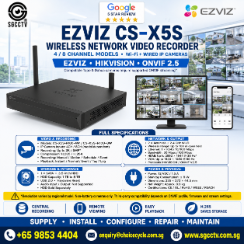
The EZVIZ CS-X5S Wireless Network Video Recorder (NVR) is designed for home, office, retail and small-business WiFi CCTV systems, providing centralised local recording for multiple EZVIZ wireless cameras.
The X5S wireless versions are available as X5S-4W and X5S-8W, supporting up to 4 or 8 WiFi/IP cameras, depending on model. Key features include 2.4GHz wireless camera connectivity, up to 100m theoretical wireless range in an open environment, H.265 compression, HDMI/VGA monitor output, ONVIF compatibility and up to 8TB HDD storage. (Ezviz)
EZVIZ X5S Key Specifications
| Feature | Specification |
|---|---|
| Models | CS-X5S-R100-4W / CS-X5S-R100-8W |
| Camera Channels | 4 / 8 Channels |
| Camera Resolution | Up to 3K on current official X5S specification |
| Wireless Frequency | 2.4GHz |
| Antennas | 2 |
| Maximum Wireless Range | Up to 100m open environment |
| Ethernet | 1 × 10/100Mbps RJ45 |
| Video Compression | H.265 / H.264 |
| HDMI Output | Up to 2592 × 1944 |
| VGA Output | Up to 1920 × 1080 |
| HDD | 1 × SATA |
| HDD Capacity | 1TB–8TB, 3.5-inch |
| Camera Protocol | EZVIZ / HIKVISION / ONVIF 2.5 |
| USB | 2 × USB 2.0 on current product listing |
| Power | 12VDC / 1.5A |
EZVIZ X5S WIRELESS NETWORK VIDEO RECORDER WIFI NVR WIFI Password ezviz_SBOSHL WIFI IP Cameras Singapore
Wireless CCTV Recording
The X5S is useful when running CAT6 from every camera back to the recorder is difficult.
A typical installation is:
EZVIZ WiFi Cameras
↓ 2.4GHz WiFi
EZVIZ X5S Wireless NVR
↓
HDD Local Recording
↓
Router / Internet
↓
EZVIZ Mobile App
The X5S-4W supports up to four WiFi cameras, while the X5S-8W supports up to eight. EZVIZ also states that these cameras can either connect directly to the X5S wirelessly or operate on the same LAN as the NVR. (EZVIZ)
Up to 100m WiFi Range
EZVIZ specifies a theoretical maximum wireless range of:
Up to 100 metres / approximately 300–328 feet
in an open environment. (Ezviz)
However, 100m should not be treated as a guaranteed indoor CCTV distance. Actual range can be significantly reduced by concrete walls, reinforced structures, metal doors, interference, camera positioning and neighbouring WiFi networks.
For Singapore condominiums, offices and commercial buildings, test the actual signal strength before final camera installation.
Important: WiFi Does Not Mean No Power
A WiFi CCTV camera still normally requires electrical power.
Wireless connection:
Camera → WiFi → X5S
Camera power:
Power Adapter → Camera
Therefore:
WiFi removes the network cable, not necessarily the power cable.
EZVIZ specifically notes that the X5S is designed for cameras that do not rely on battery power; battery-operated door viewers, doorbells and video doorphones are not supported by the X5S in this role. (Ezviz)
H.265 CCTV Recording
The X5S supports:
H.265 + H.264
video compression.
EZVIZ states that H.265 can reduce required storage and bandwidth by up to approximately 50% compared with H.264 under its test conditions. (Ezviz)
This is particularly useful for wireless CCTV because efficient compression reduces both HDD consumption and network traffic.
Up to 8TB HDD
The X5S provides:
1 × SATA HDD Interface
1TB–8TB 3.5-inch HDD Support
(Ezviz)
This allows continuous local CCTV recording without relying solely on cloud storage.
Recording retention depends on:
Number of Cameras × Resolution × Frame Rate × Bitrate × H.265/H.264 × Recording Schedule
For longer retention, motion/event recording can significantly reduce storage consumption compared with continuous recording.
HDMI + VGA Monitor Output
The NVR can connect directly to a local CCTV monitor.
It provides:
HDMI Output – up to 2592 × 1944
and
VGA Output – up to 1920 × 1080
on the current X5S specification. (Ezviz)
This allows the user to operate the NVR locally using:
Monitor + USB Mouse
for live viewing, playback and system configuration.
EZVIZ App Remote Viewing
Once the NVR is online, it can be added to an EZVIZ account by scanning the QR code on the label.
EZVIZ states that if a password is requested while adding the X5S, the required credential may be the device verification code printed on the white NVR label. (EZVIZ)
A typical remote-access architecture is:
WiFi Cameras
↓
X5S NVR
↓
Router / Internet
↓
EZVIZ APP
↓
Mobile Remote Viewing
WiFi Password: “ezviz_SBOSHL”?
This requires an important distinction.
If your phone or computer detects an SSID similar to:
ezviz_SBOSHL
that may be the wireless network being broadcast by that particular EZVIZ NVR/device.
However:
“ezviz_SBOSHL” is not a universal EZVIZ WiFi password.
Do not assume all EZVIZ X5S recorders use the same password.
The SSID and credentials can vary by device and configuration.
For security reasons, use the credentials associated with the actual NVR rather than publishing or reusing a presumed default password.
Forgot EZVIZ X5S Admin Password?
EZVIZ provides an official reset procedure.
According to EZVIZ support, the X5S admin password can be restored by using the NVR’s reset function. The password then defaults to the device’s original six-capital-letter verification code printed on the white NVR label. (EZVIZ)
EZVIZ also documents this local procedure:
1. Go to the NVR login screen
2. Double-right-click the bottom-left corner
3. Select “OK” when “Restore Default Password” appears
4. The password returns to the six-capital-letter verification code on the NVR label
(EZVIZ)
This is preferable to guessing passwords.
How to Add a WiFi Camera to X5S
For an X5S-4W or X5S-8W, compatible cameras can connect directly to the NVR’s wireless network or operate on the same LAN.
EZVIZ recommends ensuring that the camera is close to the NVR with minimal obstruction during initial pairing and that the camera is in configuration mode when connecting directly to the NVR WiFi. (EZVIZ)
A practical installation sequence is:
Power Camera
→ Reset/Configuration Mode
→ Place Near X5S
→ NVR Camera Management
→ Search Camera
→ Add
→ Confirm Live Video
→ Move Camera to Final Position
→ Test WiFi Signal Again
ONVIF Camera Compatibility
The X5S also supports:
ONVIF 2.5
and Hikvision protocol according to EZVIZ’s published specification. (Ezviz)
This can allow selected compatible third-party IP cameras to be connected.
However, ONVIF does not guarantee every proprietary feature. Functions such as advanced analytics, two-way audio, alarms and configuration options may differ with third-party cameras.
For the simplest installation:
EZVIZ Camera + EZVIZ X5S NVR
remains the preferred combination.
EZVIZ X5S WIRELESS NETWORK VIDEO RECORDER WIFI NVR WIFI Password ezviz_SBOSHL WIFI IP Cameras Singapore
| Model | Camera Capacity | Wireless |
|---|---|---|
| X5S-4W | 4 cameras | 2.4GHz |
| X5S-8W | 8 cameras | 2.4GHz |
| X5S-16H | Up to 16 cameras | 2.4GHz / 5GHz architecture |
The newer X5S-16H is substantially more capable, supporting up to 16 × 5MP cameras, dual-band camera connectivity and a 5GHz wireless uplink. (Ezviz)
Therefore, always confirm the complete model number before upgrading or replacing an X5S.
Common EZVIZ WiFi CCTV Problems
Typical faults include:
Camera Offline
NVR Cannot Find Camera
Forgot NVR Password
WiFi Password Unknown
Weak Camera WiFi Signal
No HDD Recording
HDD Error
EZVIZ App Offline
No HDMI Display
Camera Disconnects Frequently
A useful troubleshooting sequence is:
CAMERA POWER → WiFi SIGNAL → NVR → HDD → ROUTER → INTERNET → EZVIZ APP
If the camera works beside the NVR but disconnects at its final installation location, investigate WiFi coverage before replacing the camera.
EZVIZ X5S WIRELESS NETWORK VIDEO RECORDER WIFI NVR WIFI Password ezviz_SBOSHL WIFI IP Cameras Singapore
SGCCTV – Choicecycle CCTV Pte Ltd provides EZVIZ WiFi cameras, wireless NVRs, CCTV troubleshooting, password assistance, WiFi CCTV installation, HDD replacement, camera replacement and security-system upgrades.
Website: choicecycle.com.sg
Email: enquiry@choicecycle.com.sg
WhatsApp: +65 9853 4404
EZVIZ X5S official product page
10 Frequently Asked Questions
1. What is the EZVIZ CS-X5S?
It is a wireless Network Video Recorder designed to centrally record and manage compatible WiFi/IP CCTV cameras. (Ezviz)
2. How many cameras can X5S support?
The X5S-4W supports four cameras and the X5S-8W supports eight. (EZVIZ)
3. Does the X5S support 5GHz WiFi?
The standard X5S-4W/8W specification uses 2.4GHz. The X5S-16H is a different model with dual-band capabilities and 5GHz uplink. (Ezviz)
4. What is the maximum WiFi range?
EZVIZ specifies up to 100m in an open test environment, but real-world indoor range will normally be lower. (Ezviz)
5. What is the password for ezviz_SBOSHL?
There is no universal password that should be assumed from that SSID. Check the credentials/configuration for the specific NVR.
6. What if I forget the X5S admin password?
EZVIZ provides a reset procedure that restores the password to the original six-letter verification code printed on the NVR label. (EZVIZ)
7. How large a hard disk can X5S support?
The current X5S specification supports a 1TB to 8TB 3.5-inch HDD. (Ezviz)
8. Does it support H.265?
Yes. The X5S supports H.265 and H.264 video compression. (Ezviz)
9. Can third-party cameras work with X5S?
Compatible ONVIF cameras may be used; EZVIZ lists ONVIF 2.5 support. (Ezviz)
10. Can SGCCTV repair an EZVIZ WiFi CCTV system?
Yes. Troubleshooting can cover the NVR, HDD, WiFi connection, camera pairing, router/network connectivity and camera replacement.
EZVIZ X5S Singapore, CS-X5S NVR, EZVIZ WiFi NVR, EZVIZ Wireless NVR, EZVIZ WiFi Camera Singapore, EZVIZ NVR Password, ezviz_SBOSHL, EZVIZ Password Reset, Wireless CCTV Singapore, WiFi CCTV Recorder, EZVIZ Camera Offline, EZVIZ NVR Repair, WiFi Camera Repair Singapore, EZVIZ CCTV Installation, SGCCTV
#EZVIZ #EZVIZX5S #CSX5S #WirelessNVR #WiFiNVR #WiFiCCTV #WirelessCCTV #EZVIZCamera #CCTVRecorder #H265 #ONVIF #CCTVRepair #CCTVSingapore #SGCCTV #Choicecycle
EZVIZ X5S WIRELESS NETWORK VIDEO RECORDER WIFI NVR WIFI Password ezviz_SBOSHL WIFI IP Cameras Singapore
The EZVIZ CS-X5S Wireless Network Video Recorder (WiFi NVR) is a reliable, user-friendly surveillance recording solution designed specifically for EZVIZ WiFi CCTV cameras. Ideal for homes, retail shops, offices, warehouses, and SMEs in Singapore, the CS-X5S offers stable wireless connectivity, centralized video storage, and seamless remote access.
With its EZVIZ WiFi pairing system (ezviz_SBOSHL), setup is fast, secure, and does not require complex networking knowledge.
Key Features of EZVIZ CS-X5S Wireless NVR
1. True Wireless NVR for EZVIZ WiFi Cameras
The CS-X5S supports EZVIZ WiFi CCTV cameras without the need for Ethernet cabling between cameras and the recorder. Cameras connect directly to the NVR via secure EZVIZ WiFi protocols, reducing installation time and cost.
2. EZVIZ WiFi Password Pairing (ezviz_SBOSHL)
The ezviz_SBOSHL WiFi password is used for secure camera-to-NVR pairing, ensuring:
- Encrypted wireless communication
- Protection against unauthorized access
- Stable video transmission in Singapore’s dense WiFi environments
This makes the system suitable for HDB flats, condominiums, and commercial units.
3. Centralized Video Storage & Playback
The CS-X5S allows:
- Continuous 24/7 recording
- Motion-triggered recording
- Easy playback via EZVIZ App or monitor
Supports internal HDD storage for long-term video retention, ideal for security audits, incident review, and compliance needs.
4. Remote Monitoring via EZVIZ App
Users can securely access live view, playback, and alerts anytime using:
- iOS & Android EZVIZ App
- Remote access over internet
- Multi-device viewing
Perfect for business owners managing multiple locations in Singapore.
5. Optimized for Singapore Installations
The EZVIZ CS-X5S is widely deployed across:
- Retail shops
- Clinics & healthcare centres
- Offices & warehouses
- Residential properties
It performs reliably in high-interference urban WiFi conditions, common in Singapore.
Benefits of Using EZVIZ CS-X5S WiFi NVR
- No LAN cabling required for cameras
- Faster installation & lower labour cost
- Secure WiFi password-based pairing
- Centralized recording for multiple EZVIZ cameras
- Scalable and easy to maintain
Common Applications
- WiFi CCTV system for shops in Singapore
- Home security WiFi NVR solution
- EZVIZ CCTV recording upgrade
- Wireless CCTV for SME offices
Professional Installation & Support in Singapore
For EZVIZ WiFi NVR installation, WiFi password configuration, troubleshooting, or HDD upgrade, professional support ensures optimal performance and security.
🔗 Website: https://choicecycle.com.sg
📧 Email: enquiry@choicecycle.com.sg
📱 WhatsApp: +65 98534404
Free site assessment and quotation available.
SEO Keywords Targeted
- EZVIZ CS-X5S
- Wireless Network Video Recorder
- EZVIZ WiFi NVR Singapore
- ezviz_SBOSHL WiFi password
- EZVIZ WiFi CCTV cameras
- Wireless CCTV system Singapore
EZVIZ CCTV CAMERA
WIFI IP CAMERA H1C EZVIZ || EZVIZ WIFI IP CAMERA C6CN TY2 || IP CAMERA Outdoor C3W || IP CAMERA SINGAPORE EZVIZ C1HC C6CN C6TC ||
EZVIZ WIFI camera H6C C6N || EZVIZ IP CAMERA H6C PRO ||
EZVIZ 4MP Color Night Vision C3W || EZVIZ Outdoor Wi-Fi Camera C4W ||
EZVIZ BATTERY HIDDEN CAMERA CB2 || Solar-Powered CCTV Ezviz EB8-4G C8C || EZVIZ BATTERY BABY CAMERA CS-BM1 ||
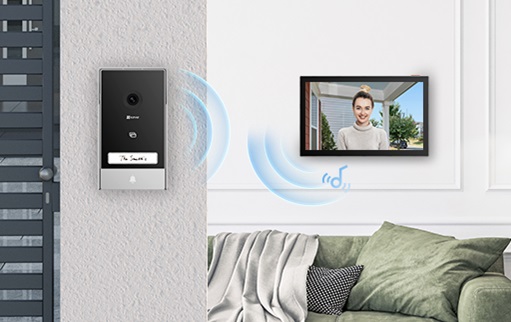
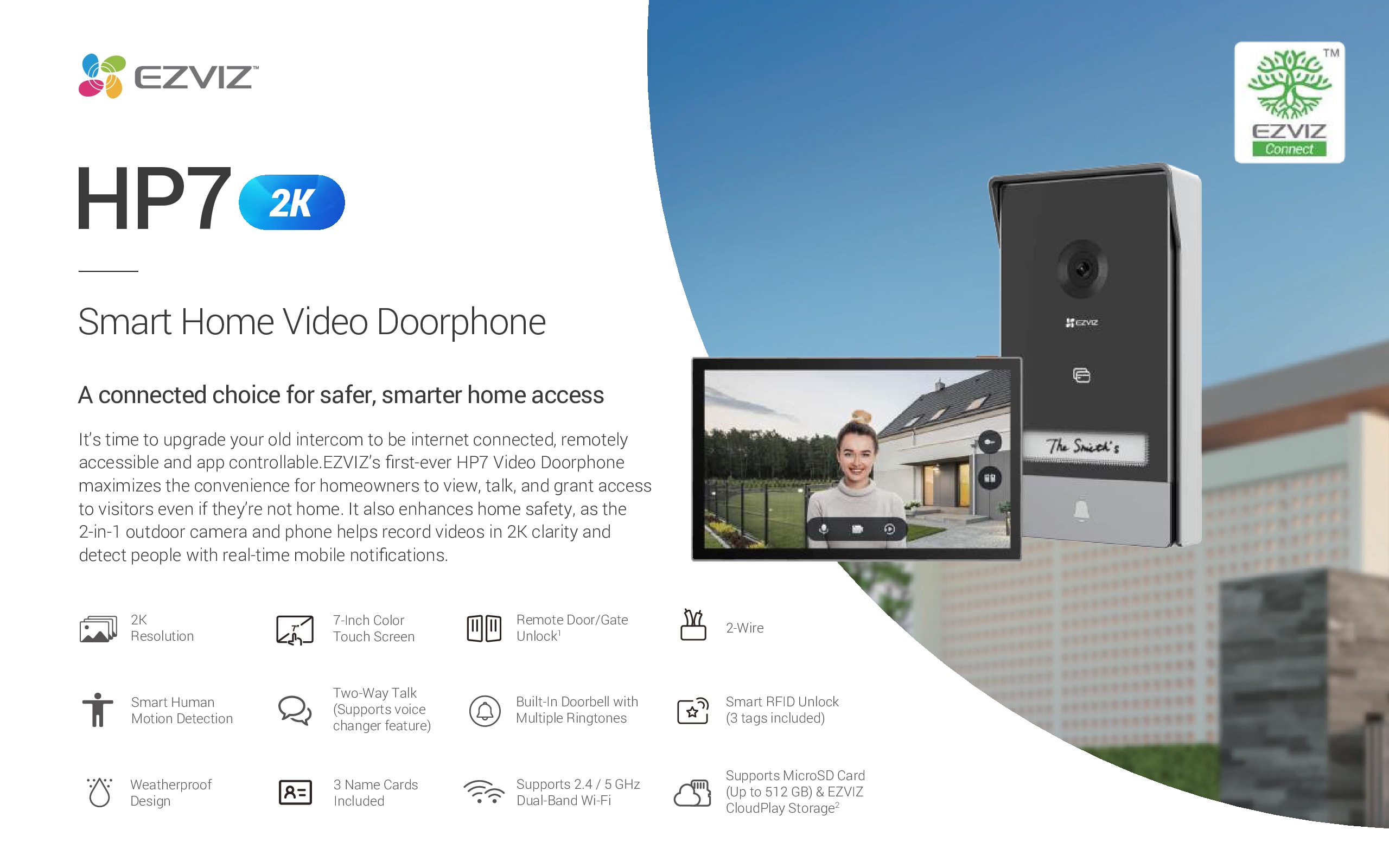
EZVIZ VIDEO DOORPHONE CS-HP7 || EZVIZ Wire-Free Doorbell DP2C || EZVIZ Video Doorbell DB2C 4MP ||
EZVIZ SMART HOME IOT T31 || EZVIZ WIRELESS NVR X5C || EZVIZ Alarm Starter Kit BS-113A || EZVIZ AIR PURIFIER EB350A || EZVIZ Smart Lock L2 IOT Home ||
EZVIZ X5S WIRELESS NETWORK VIDEO RECORDER WIFI NVR WIFI Password ezviz_SBOSHL WIFI IP Cameras Singapore


Nunc lacus elit, faucibus ac laoreet sed, dapibus ac mi. Maecenas eu ante a elit tempus fermentum. Aliquam commodo tincidunt semper. Phasellus accumsan, justo ac mollis pharetra, ex dui pharetra nisl, a scelerisque ipsum nulla ac sem. Cras eu risus urna. Duis lorem sapien, congue eget nisl sit amet, rutrum faucibus elit.
Donec accumsan auctor iaculis. Sed suscipit arcu ligula, at egestas magna molestie a. Proin ac ex maximus, ultrices justo eget, sodales orci. Aliquam egestas libero ac turpis pharetra, in vehicula lacus scelerisque. Vestibulum ut sem laoreet, feugiat tellus at, hendrerit arcu.
Nunc lacus elit, faucibus ac laoreet sed, dapibus ac mi. Maecenas eu ante a elit tempus fermentum. Aliquam commodo tincidunt semper. Phasellus accumsan, justo ac mollis pharetra, ex dui pharetra nisl, a scelerisque ipsum nulla ac sem. Cras eu risus urna. Duis lorem sapien, congue eget nisl sit amet, rutrum faucibus elit.
Related Products
CCTV CAMERA DAHUA DH-IPC-HFW2831S-S-S2 4K 8MP IP-POE STARLIGHT SMART-IR IP67 DMSS Smart PSS idmss gdmss Camera Installation Dahua Authorised Camera Repair
Save12.1%Save $40.00Only$290.00 Original price was: $330.00.$290.00Current price is: $290.00.



Reviews
There are no reviews yet.