
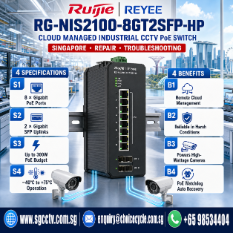
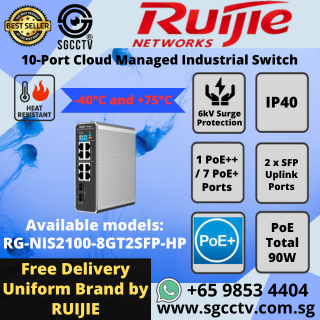
RUIJIE 10-Port Switch RG-NIS2100-8GT2SFP-HP Cloud Managed Industrial CCTV SWITCH SINGAPORE POE Switch Repair Troubleshooting
in stock
$599.00
RUIJIE SINGAPORE OFFICIAL PARTNER
Supply and Maintenance RUIJIE SWITCH Access Control System, Video Intercom.
Sim Lim Square 02-81 10am-7pm Daily.
Whatsapp Enquiry Project +65 98534404, Technical Support +65 81120788, Site Visit Maintenance +65 81985572.
in stock
RUIJIE 10-Port Switch RG-NIS2100-8GT2SFP-HP Cloud Managed Industrial CCTV SWITCH SINGAPORE POE Switch Repair Troubleshooting
RUIJIE RG-NIS2100-8GT2SFP-HP | 10-Port Industrial Cloud Managed PoE Switch | Industrial CCTV Network Switch | Singapore | Repair & Troubleshooting | SGCCTV
The Ruijie Reyee RG-NIS2100-8GT2SFP-HP is a high-performance 10-Port Industrial Cloud Managed PoE Switch designed for demanding industrial and outdoor networking environments. Featuring 8 Gigabit PoE Ethernet ports, 2 Gigabit SFP fibre uplink ports, industrial-grade reliability, and cloud management, it is ideal for powering and connecting CCTV cameras, wireless access points, industrial controllers, and access control systems.
Built for harsh operating conditions, the RG-NIS2100-8GT2SFP-HP is widely used in factories, warehouses, transportation systems, ports, utilities, smart cities, construction sites, and perimeter surveillance applications where stable networking and PoE power are essential.
SGCCTV Singapore provides Ruijie switch supply, installation, cloud configuration, troubleshooting, repair, preventive maintenance, and technical support for industrial CCTV and enterprise network infrastructures.
Key Features
- Model: Ruijie RG-NIS2100-8GT2SFP-HP
- 10-Port Industrial Managed Switch
- 8 × Gigabit PoE Ethernet Ports
- 2 × Gigabit SFP Fibre Uplink Ports
- Industrial-Grade Design
- Cloud Managed via Ruijie Cloud
- IEEE 802.3af / 802.3at PoE+
- Layer 2 Managed Switching
- VLAN Configuration
- Quality of Service (QoS)
- Access Control Lists (ACL)
- IGMP Snooping
- Loop Prevention
- STP / RSTP Support
- DIN Rail Mounting
- Wide Operating Temperature
- Surge Protection
- Reliable 24/7 Operation
Benefits
- Power IP Cameras Through a Single Ethernet Cable
- Simplify Industrial CCTV Deployment
- High-Speed Fibre Backbone Connectivity
- Remote Cloud Monitoring & Management
- Stable Long-Term Network Operation
- Reduce Installation Costs
- Improve Network Security
- Easy VLAN Segmentation
- Support Mission-Critical Applications
- Enterprise-Class Reliability
Ideal Applications
- Industrial CCTV Systems
- Smart Factories
- Warehouses
- Manufacturing Plants
- Ports & Marine Facilities
- Rail & Transport Networks
- Construction Sites
- Solar CCTV Systems
- Perimeter Security
- Oil & Gas Facilities
- Utility Infrastructure
- Smart Buildings
- Commercial Buildings
- Government Projects
- Industrial Automation
Ruijie Switch Repair & Troubleshooting Services
SGCCTV provides professional support for:
- PoE Power Failure
- Camera Offline Issues
- Fibre Uplink Faults
- Network Communication Problems
- VLAN Configuration
- Cloud Management Setup
- Firmware Upgrade
- Switch Configuration Backup
- Power Supply Troubleshooting
- Port Failure Diagnosis
- Network Performance Optimisation
- Preventive Maintenance
Our experienced engineers help minimise downtime and ensure your industrial CCTV and network systems remain reliable and secure.
Why Choose SGCCTV Singapore?
SGCCTV – Choicecycle CCTV Pte Ltd offers complete industrial networking and security solutions:
- Ruijie Industrial Switches
- Managed PoE Switches
- Industrial Fibre Networks
- CCTV Network Design
- Huawei & Cisco Networking
- Access Control Networks
- Structured Cabling
- Fibre Optic Installation
- Cybersecurity Hardening
- Preventive Maintenance
- Repair & Technical Support
Website: https://choicecycle.com.sg
Email: enquiry@choicecycle.com.sg
WhatsApp: +65 98534404
Frequently Asked Questions (FAQ)
1. What is the Ruijie RG-NIS2100-8GT2SFP-HP?
The RG-NIS2100-8GT2SFP-HP is a 10-port industrial managed PoE switch with 8 Gigabit PoE ports and 2 Gigabit SFP fibre uplink ports, designed for industrial networking and CCTV applications.
2. What devices can be powered by the PoE ports?
The PoE ports can power compatible IEEE 802.3af/at devices such as IP cameras, wireless access points, VoIP phones, and access control equipment.
3. Is the switch suitable for industrial environments?
Yes. It is designed for industrial applications with features such as DIN rail mounting, surge protection, and reliable operation across a wide operating temperature range.
4. What are the benefits of cloud management?
Cloud management allows administrators to monitor switch status, configure settings, troubleshoot issues, and manage multiple devices remotely through the Ruijie Cloud platform.
5. Why are the SFP ports important?
The two Gigabit SFP ports support fibre optic uplinks, enabling long-distance, high-speed connections between switches and core network equipment.
6. Does the switch support VLAN configuration?
Yes. It supports VLANs to separate network traffic for CCTV, office systems, wireless networks, and other services, improving security and performance.
7. Can this switch be used for CCTV systems?
Yes. It is ideal for CCTV deployments, providing stable PoE power, Gigabit connectivity, fibre uplinks, and managed network features.
8. Does SGCCTV provide repair and troubleshooting services?
Yes. SGCCTV offers troubleshooting, repair, firmware upgrades, cloud configuration, PoE diagnostics, fibre network support, and preventive maintenance for Ruijie networking products.
9. Can the switch integrate with existing enterprise networks?
Yes. The RG-NIS2100-8GT2SFP-HP integrates with compatible routers, firewalls, managed switches, and fibre optic infrastructures to support enterprise networking requirements.
10. Why choose SGCCTV Singapore?
SGCCTV provides professional consultation, industrial networking design, switch installation, fibre optic deployment, CCTV integration, cloud management configuration, troubleshooting, and long-term technical support throughout Singapore.
RUIJIE 10-Port Switch RG-NIS2100-8GT2SFP-HP Cloud Managed Industrial CCTV SWITCH SINGAPORE POE Switch Repair Troubleshooting
Availability & Pricing
💰 Price: SGD $599.00 (Excluding GST)
Original Price: SGD $1,198.00
📍 Stock Availability:
- Tuas: 18 units available
- Bukit Batok & Ubi: Out of Stock
🚚 Shipping & Delivery
- FREE Shipping via In-House Delivery (1-3 working days).
- Orders above S$500 qualify for FREE SHIPPING!
Contact Information
📍 Store Location:
SGCCTV Choicecycle, Sim Lim Square CCTV Specialist #02-81
🕒 Operating Hours:
11 AM – 8 PM
📲 WhatsApp:
+65 98534404 (For stock inquiries before visiting)
📧 Email:
enquiry@choicecycle.com.sg
🌐 Website:
https://choicecycle.com.sg
RUIJIE 10-Port Switch RG-NIS2100-8GT2SFP-HP Cloud Managed Industrial CCTV SWITCH SINGAPORE POE Switch Repair Troubleshooting
The Ruijie Reyee RG-NIS2100-8GT2SFP-HP is an industrial 8-Port Gigabit PoE + 2-Port SFP Cloud Managed Switch. It is commonly used for CCTV, Wi-Fi, industrial automation, and outdoor surveillance systems. It supports Ruijie Cloud management, VLANs, QoS, STP, LACP, and industrial networking features. (Manuals+)
Typical Cabling
                    Internet
                        │
                  Firewall / Router
                        │
                 Gigabit LAN Port
                        │
          =============================
          │  RG-NIS2100-8GT2SFP-HP     │
          │                            │
LAN ------│ Port 1                     │
Camera 1 -│ Port 2 (PoE)               │
Camera 2 -│ Port 3 (PoE)               │
Camera 3 -│ Port 4 (PoE)               │
Camera 4 -│ Port 5 (PoE)               │
Camera 5 -│ Port 6 (PoE)               │
Access AP │ Port 7 (PoE)               │
Door Ctrl │ Port 8 (PoE)               │
          │                            │
SFP1 ------ Fibre to Core Switch
SFP2 ------ Fibre Redundancy / NVR
Industrial CCTV Network Example
Internet
     │
Huawei / Fortinet Firewall
     │
Core Switch
     │
10G Fibre
     │
RG-NIS2100-8GT2SFP-HP
     ├── IP Camera 1
     ├── IP Camera 2
     ├── IP Camera 3
     ├── IP Camera 4
     ├── IP Camera 5
     ├── WiFi Bridge
     ├── Access Control
     └── Industrial PC
Step 1 – Power
Connect:
- Industrial DC power supply
- Ensure power source matches the switch specifications
- Confirm the Power LED is on before connecting field devices. Refer to the installation guide for the supported input voltage and wiring requirements. (Manuals+)
Step 2 – Connect Your PC
Connect your laptop to any LAN port.
Set your PC to:
- Obtain IP automatically (DHCP)
or
Assign a static IP if your deployment uses a static management address.
Step 3 – Find the Switch
Option 1 (Recommended)
Use:
Ruijie Reyee App
The App automatically discovers the switch and allows cloud onboarding, monitoring, and basic configuration. Ruijie’s documentation includes cloud onboarding and configuration guidance. (Ruijie Networks)
Option 2
Use the Web GUI by browsing to the switch’s management IP address after it has obtained or been assigned one.
Step 4 – Upgrade Firmware
Navigate to:
System → Firmware Upgrade
Install the latest firmware before putting the switch into production.
Step 5 – Configure Management IP
Example:
IP Address
192.168.1.10

Subnet
255.255.255.0

Gateway
192.168.1.1

DNS
8.8.8.8
Step 6 – Configure PoE
Go to:
PoE Management
Typical settings:
- Enable PoE on required ports
- Configure PoE priority
- Set PoE power limits if needed
- Monitor PoE consumption
Useful for:
- Hikvision Cameras
- Dahua Cameras
- Wi-Fi Access Points
- Door Access Controllers
Step 7 – Configure VLAN
Example:
| VLAN | Purpose |
|---|---|
| VLAN 1 | Management |
| VLAN 10 | CCTV Cameras |
| VLAN 20 | Office Network |
| VLAN 30 | Wi-Fi |
| VLAN 40 | Access Control |
Example port assignment:
| Port | VLAN |
|---|---|
| Port 1 | Trunk |
| Ports 2–5 | VLAN 10 |
| Port 6 | VLAN 20 |
| Port 7 | VLAN 30 |
| Port 8 | VLAN 40 |
Managed switches generally require you to:
- Create the VLAN.
- Assign ports as untagged (access) or tagged (trunk).
- Apply and save the configuration. (Ruijie Networks)
Step 8 – Configure SFP Fibre
Install compatible SFP modules.
Connect:
RG-NIS2100
      │
  Fibre Cable
      │
 Core Switch
Typical applications:
- Building-to-building
- Factory-to-office
- Long-distance CCTV
- Industrial backbone
Step 9 – Enable STP
Recommended:
RSTP
to prevent switching loops in redundant network topologies.
Step 10 – Enable QoS
Prioritise CCTV traffic over general office traffic.
Typical priorities:
- CCTV
- VoIP
- Access Control
- Office PCs
Step 11 – Enable Security
Recommended settings:
- Disable unused ports
- Enable Port Security
- Enable Storm Control
- Restrict management access to trusted IPs
- Change the default administrator password
- Keep firmware updated
Step 12 – Save Configuration
Always save the running configuration so it survives a reboot.
Example CCTV Network
                    Internet
                        │
                Fortinet Firewall
                        │
               Huawei Core Switch
                        │
                   Fibre 10G
                        │
         RG-NIS2100-8GT2SFP-HP
      ├── Hikvision Camera 1
      ├── Hikvision Camera 2
      ├── Hikvision Camera 3
      ├── Hikvision Camera 4
      ├── Hikvision NVR
      ├── WiFi Bridge
      ├── Access Control
      └── Industrial PC
Recommended Settings for CCTV Projects
- Management IP: Static
- PoE: Enabled only on required ports
- VLAN 10: CCTV Cameras
- VLAN 20: Office Network
- VLAN 30: Wi-Fi
- QoS: CCTV traffic priority
- RSTP: Enabled
- Storm Control: Enabled
- Firmware: Latest stable version
- Cloud Management: Enabled if remote monitoring is required
This configuration provides a secure, scalable foundation for CCTV and industrial networking while allowing remote monitoring and management through the Ruijie cloud platform. (Ruijie Networks)
RUIJIE 10-Port Switch RG-NIS2100-8GT2SFP-HP Cloud Managed Industrial CCTV SWITCH SINGAPORE POE Switch Repair Troubleshooting
Ruijie Networks is a Chinese networking equipment manufacturer.
Company Information
| Item | Details |
|---|---|
| Company Name | Ruijie Networks Co., Ltd. |
| Country of Origin | China |
| Founded | 2003 (ruijie.co.jp) |
| Headquarters | Fuzhou, Fujian Province, China (Ruijie Networks) |
| Industry | Enterprise Networking & ICT Infrastructure |
| Main Products | Managed Switches, Industrial Switches, Wi-Fi Access Points, Routers, Firewalls, Data Centre Switches, Cloud Networking, SD-WAN |
| Global Presence | Products and solutions deployed in 147+ countries and regions (Ruijie Networks) |
| Employees | 7,200+ worldwide (Ruijie Networks) |
| R&D Centres | 8 (Ruijie Networks) |
Headquarters
Ruijie Networks Co., Ltd.
Building 19, Juyuanzhou Industrial Park
No. 618 Jinshan Road
Cangshan District
Fuzhou, Fujian, China (Ruijie Networks)
Global Markets
Ruijie provides networking solutions for:
- Enterprise Networks
- Data Centres
- Industrial Ethernet
- CCTV Networks
- Wi-Fi 6 & Wi-Fi 7
- Smart Campuses
- Hotels
- Healthcare
- Manufacturing
- Government
- Transportation
- Retail
- Education
Its products are sold through distributors and partners across Asia, Europe, the Middle East, Africa, and the Americas. (Ruijie Networks)
Ruijie vs Reyee
Ruijie has two primary product brands:
- Ruijie Networks – Enterprise networking products for businesses, data centres, industrial applications, and large campuses.
- Reyee – SMB and installer-focused networking products with simplified cloud management, suitable for SMEs, retail, hotels, CCTV, and managed Wi-Fi deployments. (Ruijie Networks)
Typical Competitors
- Cisco
- Huawei
- HPE Aruba
- Juniper Networks
- H3C
- TP-Link Omada
- Ubiquiti UniFi
- MikroTik
Is Ruijie a Good Brand?
Ruijie has become well established in enterprise networking, particularly in Asia. It is known for:
Advantages
- Competitive pricing
- Enterprise-grade managed switches
- Industrial Ethernet switches
- Cloud management platform
- Strong PoE switch portfolio
- Good integration for CCTV, Wi-Fi, and access control projects
- Suitable for SMEs through to enterprise deployments
Considerations
- Smaller global ecosystem than Cisco
- Compatibility and long-term support should be evaluated for projects with specific regulatory or customer requirements
- Always verify local distributor support, firmware availability, and warranty coverage before deployment
For many SME, CCTV, and industrial networking projects in Singapore, Ruijie offers a strong balance of features and cost, while Cisco and Aruba are more commonly selected for organizations with standardized enterprise networking environments or strict vendor policies.
RUIJIE 10-Port Switch RG-NIS2100-8GT2SFP-HP Cloud Managed Industrial CCTV SWITCH SINGAPORE POE Switch Repair Troubleshooting


Nunc lacus elit, faucibus ac laoreet sed, dapibus ac mi. Maecenas eu ante a elit tempus fermentum. Aliquam commodo tincidunt semper. Phasellus accumsan, justo ac mollis pharetra, ex dui pharetra nisl, a scelerisque ipsum nulla ac sem. Cras eu risus urna. Duis lorem sapien, congue eget nisl sit amet, rutrum faucibus elit.
Donec accumsan auctor iaculis. Sed suscipit arcu ligula, at egestas magna molestie a. Proin ac ex maximus, ultrices justo eget, sodales orci. Aliquam egestas libero ac turpis pharetra, in vehicula lacus scelerisque. Vestibulum ut sem laoreet, feugiat tellus at, hendrerit arcu.
Nunc lacus elit, faucibus ac laoreet sed, dapibus ac mi. Maecenas eu ante a elit tempus fermentum. Aliquam commodo tincidunt semper. Phasellus accumsan, justo ac mollis pharetra, ex dui pharetra nisl, a scelerisque ipsum nulla ac sem. Cras eu risus urna. Duis lorem sapien, congue eget nisl sit amet, rutrum faucibus elit.


Reviews
There are no reviews yet.