
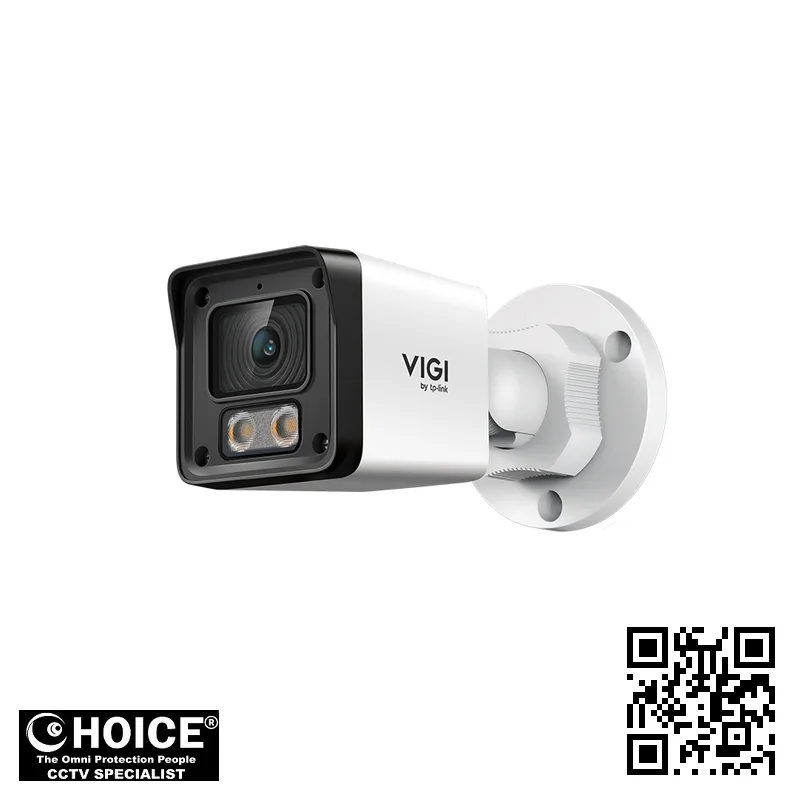
TP-Link EasyCam C320 VIGI 2MP Outdoor Full-Color Bullet Network Camera
TP-LINK PREMIUM PARTNERS SINGAPORE
Supply and Maintenance TP-LINK CCTV IP Cameras, NVR, DVR, PTZ Cameras,
Access Control System, Video Intercom.
1 Rochor Canal Road, Sim Lim Square 02-81 10am-7pm Daily.
Whatsapp Enquiry Project +65 98534404, Technical Support +65 81120788, Site Visit Maintenance +65 81985572.
TP-Link EasyCam C320 Singapore VIGI 2MP Outdoor Full-Color Bullet Network Camera | Superior 24/7 Full-Color Night Vision
TP-Link EasyCam C320 Singapore provides a sophisticated security solution for those seeking high-definition surveillance that does not compromise on clarity during the darkest hours. As a dedicated part of the VIGI ecosystem, this 2MP outdoor bullet camera is engineered to deliver vibrant, full-color imagery even when lighting conditions are extremely low. For property owners across Singapore, this means the ability to identify colors of clothing, vehicles, and surroundings with much higher precision than traditional monochrome infrared cameras. Whether you are securing a residential perimeter or a commercial storefront, the EasyCam C320 offers a robust, reliable, and intelligent monitoring option that integrates seamlessly into modern IP networking infrastructures.
Key Features of the TP-Link EasyCam C320 Singapore
- Advanced Full-Color Technology: Unlike standard cameras that switch to black and white, this model utilizes integrated white LEDs to maintain vivid color details throughout the night.
- High-Definition 2MP Resolution: The 1920 x 1080 resolution ensures that every captured frame is crisp, allowing for better identification of faces and license plates.
- Intelligent Motion Detection: The system features enhanced human and vehicle classification, which significantly reduces false alarms caused by shadows, animals, or swaying trees.
- Weatherproof IP67 Rating: Designed to withstand the intense tropical rain and humidity of Singapore, the rugged exterior protects internal components from water and dust ingress.
- Efficient H.265+ Compression: This cutting-edge video compression technology reduces bandwidth usage and storage requirements without sacrificing the essential image quality.
- Built-in Audio Monitoring: The integrated microphone allows for real-time audio recording, providing a complete picture of the events occurring within the camera’s radius.
- Smart Event Notifications: Receive instant alerts via the VIGI App for specific triggers such as line-crossing, intrusion detection, or unauthorized region entry.
- Wide Dynamic Range (DWDR): The camera manages challenging lighting environments, such as bright sunlight and deep shadows, to prevent overexposure or obscured details.
Technical Specifications
| Specification | Detail |
| Brand / Model | TP-Link EasyCam C320 VIGI |
| Resolution | 1920 x 1080 (2MP Max) |
| Image Sensor | 1/3” Progressive Scan CMOS |
| Lens Options | 2.8 mm / 4 mm / 6 mm Fixed Focal |
| Field of View (2.8mm) | Horizontal: 98.8°, Vertical: 53.5°, Diagonal: 117° |
| Night Vision Range | Up to 30m (IR and White Light) |
| Video Compression | H.265+, H.265, H.264+, H.264 |
| Audio | Built-in Microphone (8KHz Sampling Rate) |
| Ingress Protection | IP67 Weatherproof |
| Power Supply | PoE (802.3af, Class 0, Max 7.1W) |
| Operating Temperature | -30 °C to 60 °C |
| Network Interface | 1 RJ45 10/10s Self-Adaptive Ethernet Port |
| Protocols | TCP/IP, UDP, HTTP, HTTPS, SMTP, IPv4, IPv6 |
| Certifications | CE, NTRA, KC, BSMI, IC, ROHS |
Applications and Use Cases in Singapore
Warehouse & Logistics: The TP-Link EasyCam C320 is ideal for monitoring large loading bays and perimeter fences. Its ability to detect vehicle movement and provide full-color night vision helps in tracking logistics assets and preventing unauthorized access during off-hours.
Retail Stores: For shop owners in busy shopping districts, this camera provides excellent coverage of entrances and aisles. The human detection feature helps monitor foot traffic and alerts staff to unusual activities near high-value merchandise displays.
HDB & Condominium Perimeters: Enhance the security of residential estates by monitoring common corridors, carpark entrances, and gate areas. The IP67 rating ensures the camera remains operational despite the heavy monsoon rains frequent in Singapore.
Office Buildings: Secure corporate assets and monitor office entrances using the professional VIGI ecosystem. The discreet bullet design and smart event alerts allow for unobtrusive yet highly effective workplace surveillance and safety management.
Car Parks: Use the 2.8mm wide-angle lens to cover large sections of multi-story carparks. The color night vision is particularly useful for capturing the correct color of vehicles and identifying license plate details in low-light conditions.
Industrial Factories: Protect high-value machinery and production lines from theft or tampering. The robust construction of the EasyCam C320 makes it suitable for harsh industrial environments where dust and temperature fluctuations are common.
Why Choose the TP-Link EasyCam C320 Singapore
Choosing the TP-Link EasyCam C320 Singapore means investing in hardware specifically capable of handling the unique environmental challenges of our region. The high humidity and frequent heavy downpours in Singapore can quickly degrade inferiorly built cameras, but the IP67-rated casing of the VIGI series provides much-needed resilience. Furthermore, the camera is designed to operate effectively within the standard electrical framework, ensuring stability during the frequent tropical thunderstorms.
Security compliance is also a vital consideration for local businesses. When deploying the EasyCam C320, users can implement privacy masks to ensure that sensitive areas are not recorded, helping your organization remain aligned with the Personal Data Protection Act (PDPA) requirements in Singapore. This ensures that while you are monitoring for safety, you are also respecting the privacy rights of employees and the public.
Installation Guide
The installation of the TP-Link EasyCam C320 is streamlined through the use of Power over Ethernet (PoE) technology. By using a single Ethernet cable, you can deliver both high-speed data and electrical power to the camera, significantly reducing the need for complex wiring and additional power outlets near the mounting point. This is particularly advantageous for outdoor installations where running separate power lines can be difficult and costly.
For a successful setup, ensure that your network infrastructure includes a PoE-capable switch or a compatible NVR. Once the hardware is physically mounted, the configuration can be managed through the VIGI App, Web UI, or the VICI VMS on a PC. The initial setup involves assigning an IP address via the VIGI Config Tool and configuring your motion detection zones to ensure you only receive alerts for relevant activities.
When mounting the camera, consider the focal length chosen (2.8mm, 4mm, or 6mm) to determine the optimal height and angle. A lower mounting height provides a wider view but may be more susceptible to tampering, while a higher mount offers a broader overview of the area but requires higher resolution to identify small details like faces clearly.
Repair and Maintenance
To ensure the longevity of your TP-Link EasyCam C320 Singapore, a regular maintenance schedule is highly recommended. Periodically check the camera lens for any buildup of dust, spider webs, or water spots that could obscure the image quality. Since this is an outdoor unit, cleaning the housing with a soft, damp cloth can help maintain the integrity of the waterproof seals and the clarity of the night vision LEDs.
Common issues often stem from network instability or power fluctuations. If you notice intermittent video loss, check the Ethernet cable connections and ensure the PoE switch is providing sufficient wattage. If the image appears blurry, verify that the focus has not been disturbed by external vibrations and check the firmware version via the VIGI App to ensure you are running the latest security patches and performance updates.
Where to Buy the EasyCam C320 in Singapore
SGCCTV — Authorised Hikvision & Dahua Dealer Singapore
Address: 1 Rochor Canal Road, Sim Lim Square #02-81, Singapore
Email: enquiry@choicecycle.com.sg
WhatsApp: +65 98534404 (24 hours)
Operating Hours: 10:00 AM – 7:00 PM daily
Website: https://choicecycle.com.sg
For genuine TP-Link VIGI products and professional security advice, visit SGCCTV (Choicecycle CCTV Pte Ltd) at our Sim Lim Square outlet. We provide expert guidance to help you find the right surveillance configuration for your specific needs.
Company: SGCCTV (Choicecycle CCTV Pte Ltd)
Address: 1 Rochor Canal Road, Sim Lim Square #02-81, Singapore 188504
WhatsApp enquiry: +65 98534404
Technical support: +65 81120788
Site visit / maintenance: +65 81985572
Email: enquiry@choicecycle.com.sg
Website: https://choicecycle.com.sg
Opening hours: 10:00 AM – 7:00 PM daily
Please note that for all pricing inquiries, availability, and customized system quotes, please WhatsApp +65 98534404. Our team will be happy to assist you with your specific requirements.
Frequently Asked Questions
How can I find out the price of the TP-Link EasyCam C320?
To ensure you receive the most accurate and up-toable information regarding the cost of the EasyCam C320, please WhatsApp +65 98534404. Our staff can provide you with detailed pricing information and discuss any specific package requirements or bulk purchase needs you may have for your security setup.
Is the camera suitable for outdoor use in Singapore’s weather?
Yes, the TP-Link EasyCam C320 is specifically designed with an IP67 rating, making it highly resistant to the heavy rain and dust common in Singapore. The robust construction ensures that the internal electronics remain protected from moisture ingress, ensuring reliable 24/7 operation throughout the year.
Can I view the camera footage on my mobile phone?
Absolutely. The VIGI ecosystem allows you to access live streams and recorded footage directly on your smartphone via the VIGI App. This allows you to monitor your premises from anywhere in the world, provided your mobile device has a stable internet connection, giving you peace of much-needed peace of mind.
Does this camera support night vision in total darkness?
Yes, the camera features both Infrared (IR) and White LED illuminators. In complete darkness, the IR LEDs provide a range of up to 30 meters. Additionally, the White LED feature allows the camera to capture full-color images even at night, which is much more effective for identifying specific colors.
What is the difference between the 2.8mm and 6mm lens options?
The lens focal length determines the field of view. The 2.8mm lens provides a wider angle, making it great for large areas like car parks. The 6mm lens provides a narrower, more zoomed-in view, which is better for focusing on specific entry points or gates where detail is more important than width.</
Will this camera work with my existing PoE switch?
The EasyCam C320 supports the IEEE 802.3af PoE standard. As long as your existing network switch is PoE-capable and provides sufficient power budget (the camera requires a maximum of 7.1W), it should work seamlessly. We recommend checking your switch’s total power capacity before installation.
Does the camera include a built-in microphone for audio recording?
Yes, this model comes equipped with an integrated microphone that allows for audio recording within a radius of approximately 5 meters. This feature is excellent for adding context to your video footage, such as hearing sounds of breaking glass or verbal interactions at a doorway or entrance.
How much storage space do I need for the recorded footage?
Storage requirements depend on your resolution settings, frame rate, and the H.265+ compression efficiency. Because the camera uses advanced compression, it significantly reduces the amount of storage needed compared to older cameras. For specific storage calculations based on your retention needs, please contact us via WhatsApp.
Can the camera detect humans and vehicles specifically?
Yes, one of the standout features of the VIGI series is its enhanced motion detection. The camera can distinguish between humans and vehicles, which helps in reducing the number of false notifications caused by shadows, animals, or environmental changes, ensuring you only get alerted to real security threats.
Is there any warranty provided with the purchase?
All products purchased through SGCCTV are covered by standard manufacturer warranties and our professional support services. For specific details regarding warranty periods and the claims process for your particular model, please reach out to our technical support team via the contact details provided on our website.
Related Products
In conclusion, the TP-Link EasyCam C320 is a premier choice for anyone seeking high-quality, full-color surveillance in Singapore. With its IP67 weather resistance, intelligent detection capabilities, and seamless PoE integration, it provides a robust layer of protection for any environment. For professional installation advice, detailed pricing, or to check the availability of this model, please contact SGCCTV today. WhatsApp +65 98534404 or visit our website at https://choicecycle.com.sg to secure your property with the best in VIGI technology.
Choosing the TP-Link EasyCam C320 for Your Singapore Property
Selecting the right surveillance system is a critical decision for any property owner in Singapore. Whether you are securing a high-rise apartment or a sprawling industrial estate, the TP-Link EasyCam C32
For residents living in HDB flats, security often focuses on monitoring common corridors or entrance foyers. The compact design of the TP-Link EasyCam C320 makes it an unobtrusive yet powerful addition to your home setup.
Condo owners can leverage this camera to monitor private balconies or perimeter walkways. Its ability to provide clear, high-definition footage ensures that your private sanctuary remains under constant, reliable digital watch.
If you own a landed property, such as a terrace or semi-detached house, coverage needs are much broader. You require a camera that can monitor large gates, garden areas, and side alleys with absolute precision.
The TP-Link EasyCam C320 is particularly effective for larger perimeter monitoring. Its wide-angle lens and superior night vision capabilities allow you to keep an eye on every corner of your compound throughout the night.
Retail shop owners in busy districts like Orchard or Bugis need to prevent shoplifting and monitor staff. This camera provides the clarity needed to identify faces and track movement within a crowded retail environment.
For office managers, surveillance is about protecting sensitive documents and expensive hardware. Installing this camera near server rooms or pantry areas provides an extra layer of internal security and accountability.
Warehouse operators in Jurong or Changi face unique challenges with large, dark spaces. The full-color night vision feature is a game-changer here, ensuring that even the dimmest corners of your facility are clearly visible.
Singapore’s tropical climate presents significant hardware challenges. High humidity and frequent heavy downpours can easily damage standard electronic components if they are not properly rated for outdoor use.
The rugged build of this camera is designed to withstand the elements. It is engineered to endure the intense heat of the midday sun and the sudden, heavy tropical thunderstorms common in our region.
Weatherproofing is non-negotiable for any outdoor installation in Singapore. You need hardware that resists moisture ingress and prevents condensation from obscuring your vital security footage during the monsoon season.
Typical placements for this model include eaves, overhangs, and mounting brackets on external walls. Placing it under a roof overhang can further extend the lifespan of the device by reducing direct rain exposure.
You might also consider mounting it near driveway entrances or garage doors. This allows for easy monitoring of vehicle arrivals and departures, providing peace of mind for families and business owners alike.
In industrial settings, mounting the camera on high poles or structural beams is ideal. This elevated position provides a comprehensive view of loading bays and large-scale inventory movement across the floor.
The ease of integration with existing network infrastructures makes it a favorite for smart home enthusiasts. You can easily access your live feed via smartphone, allowing for remote monitoring from anywhere in Singapore.
Ultimately, the goal of any security investment is to reduce uncertainty. By choosing a reliable, weather-resistant, and high-definition solution, you are investing in the long-term safety of your assets and loved ones.
Installation and Setup Guide for the TP-Link EasyCam C320
Setting up your new TP-Link EasyCam C320 requires careful planning to ensure maximum coverage and reliability. Whether you are securing a landed property in Jurong or a shopfront in Orchard, the initial placement determines the effectiveness of your surveillance system.
The first step in the process involves choosing the right mounting options. The C320 features a versatile mounting bracket that allows for various angles. You can mount it on a wall, a ceiling, or even an eave to capture the widest possible field of view.
For outdoor environments in Singapore, ensure the mounting surface is stable and weather-resistant. Because this is an outdoor-rated bullet camera, it can withstand heavy tropical rain, but a secure, vibration-free mount is essential for maintaining sharp, clear video footage.
When planning your wiring, you must decide between PoE and traditional power methods. Power over Ethernet (PoE) is the gold standard for professional setups. It allows a single Ethernet cable to provide both high-speed data and electrical power to the camera.
Using PoE simplifies the installation significantly by reducing the number of cables running through your walls. This is particularly useful for complex Singapore residential layouts where power outlets might be difficult to access near the camera’s mounting location.
If you choose not to use PoE, you will need to install a nearby power adapter. While this is possible, it often leads to more cluttered wiring and more potential points of failure during the humid monsoon seasons in Singapore.
Once the hardware is mounted, the next phase is network and NVR pairing. The TP-Link EasyCam C320 is designed to integrate seamlessly into a wider VIGI ecosystem. Connecting it to a Network Video Recorder (NVR) allows for centralized management.
Pairing the camera with an NVR ensures that your footage is stored locally on a hard drive. This provides a layer of security, as your recordings are not solely dependent on cloud availability or internet bandwidth fluctuations.
For those preferring a wireless-first approach, the camera can also be configured to work over your existing local network. However, for high-resolution 2MP streaming, a wired Ethernet connection is always recommended to prevent video lag or latency.
After the hardware is connected, the app configuration stage begins. You will use the TP-Link Tapo or VIGI mobile applications to bring your camera online. This allows you to view live feeds directly on your smartphone from anywhere in the world.
During the app setup, you will follow a step-by-step wizard to connect the device to your Wi-Fi or LAN. This is the perfect time to configure motion detection zones and set up instant push notifications for any detected movement.
The app configuration also allows you to customize the Full-Color Night Vision settings. You can decide how the camera handles low-light transitions, ensuring that your property remains visible even during the darkest hours of the night.
While DIY installation is possible, many homeowners prefer a professional SGCCTV installation. A professional service ensures that every aspect of the system is optimized for the unique architectural challenges found in Singapore properties.
A professional installation includes precise camera positioning to eliminate blind spots. Our technicians ensure that the TP-Link EasyCam C320 is angled perfectly to capture entrances, driveways, and perimeter boundaries without unnecessary glare or obstructions.
Furthermore, professional installers handle all the complex cabling work. We hide unsightly wires inside conduits or wall cavities, ensuring a clean, aesthetic look that complements your home or business interior without compromising on security strength.
Our service also includes a full system test. We verify that the network stability is optimal, the NVR is recording correctly, and the mobile app is communicating flawlessly with your devices before we complete the job.
Choosing a professional setup means you get peace of mind. You can rest easy knowing your security infrastructure is robust, professionally calibrated, and ready to protect your assets against any unforeseen security threats in the local area.
TP-Link EasyCam C320: Frequently Asked Questions
Where can I buy the TP-Link EasyCam C320?
You can buy the TP-Link EasyCam C320 from SGCCTV at Sim Lim Square #02-81, or order online.
Is the TP-Link EasyCam C320 suitable for outdoor use?
Yes — the TP-Link EasyCam C320 is built for Singapore’s tropical, humid weather.
Does the TP-Link EasyCam C320 come with a warranty?
Every TP-Link EasyCam C320 includes local warranty support from SGCCTV. Our team will confirm the exact coverage when you enquire.
How much does the TP-Link EasyCam C320 cost?
WhatsApp +65 98534404 for the best price on the TP-Link EasyCam C320 today.
Can SGCCTV install the TP-Link EasyCam C320?
Yes, SGCCTV offers professional installation for the TP-Link EasyCam C320 across Singapore.
Is the TP-Link EasyCam C320 available?
Availability of the TP-Link EasyCam C320 is confirmed by our team — WhatsApp +65 98534404 and we will check the current position for you.
What resolution does the TP-Link EasyCam C320 record?
The TP-Link EasyCam C320 captures sharp, detailed footage well suited to Singapore homes and businesses.
Does the TP-Link EasyCam C320 work at night?
Yes, the TP-Link EasyCam C320 delivers clear low-light footage, tested for Singapore conditions.
Can I view the TP-Link EasyCam C320 on my phone?
You can monitor the TP-Link EasyCam C320 remotely from anywhere in Singapore via the mobile app.
What warranty covers the TP-Link EasyCam C320?
The TP-Link EasyCam C320 is backed by local warranty support from SGCCTV in Singapore.
Why buy the TP-Link EasyCam C320 from SGCCTV?
SGCCTV is a trusted Singapore dealer offering the TP-Link EasyCam C320 at the best price with expert support.


Nunc lacus elit, faucibus ac laoreet sed, dapibus ac mi. Maecenas eu ante a elit tempus fermentum. Aliquam commodo tincidunt semper. Phasellus accumsan, justo ac mollis pharetra, ex dui pharetra nisl, a scelerisque ipsum nulla ac sem. Cras eu risus urna. Duis lorem sapien, congue eget nisl sit amet, rutrum faucibus elit.
Donec accumsan auctor iaculis. Sed suscipit arcu ligula, at egestas magna molestie a. Proin ac ex maximus, ultrices justo eget, sodales orci. Aliquam egestas libero ac turpis pharetra, in vehicula lacus scelerisque. Vestibulum ut sem laoreet, feugiat tellus at, hendrerit arcu.
Nunc lacus elit, faucibus ac laoreet sed, dapibus ac mi. Maecenas eu ante a elit tempus fermentum. Aliquam commodo tincidunt semper. Phasellus accumsan, justo ac mollis pharetra, ex dui pharetra nisl, a scelerisque ipsum nulla ac sem. Cras eu risus urna. Duis lorem sapien, congue eget nisl sit amet, rutrum faucibus elit.

Reviews
There are no reviews yet.